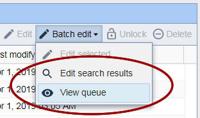
Batch editing is now available on all search results as a background task. In addition, a new "View queue" button allows you to manage your task queue, see how many assets have been processed, and cancel jobs.
The new "batch edit search" permission must be applied to a user group before members of that group have access to batch edit more than 25 assets at a time.
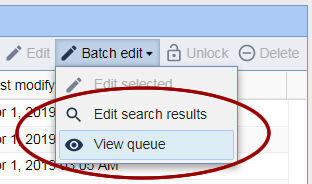
Batch editing is now available on all search results as a background task. In addition, a new "View queue" button allows you to manage your task queue, see how many assets have been processed, and cancel jobs.
A new "edit search results" button will now be available which will allow for a background task to be created, and named, that will run as long as necessary to finish editing an unlimited number of assets. In addition, a "view queue" button is also available, which allows administrators to see the queued tasks.
Note: only one task can run at a time, including shorter jobs with only a few assets to change. So, longer jobs should be handled during the off hours if possible.
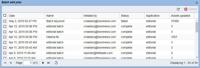
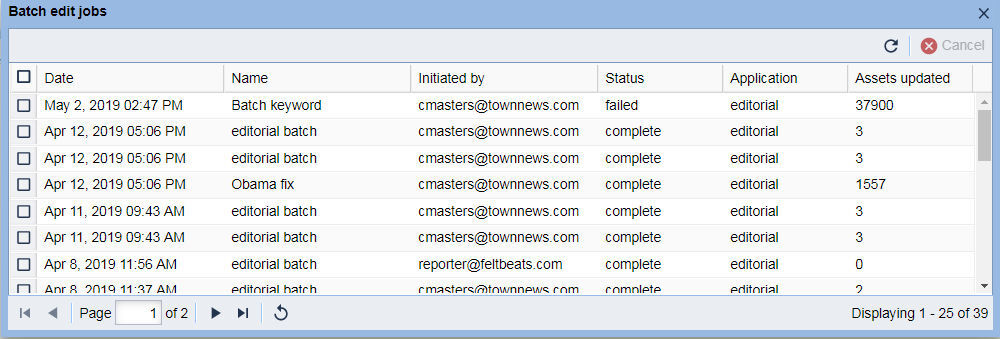
The entries in the UI are: the date, task name, author, status, and asset count. The jobs are listed in the order they are received. Any entry can be cancelled by an administrator with the correct permissions. The job and asset count will update every 50 records when refreshed.
A queue is now available to manage background tasks.
The interface will check for new tasks every 5 minutes. For every 50 records, it will update associated database entries with the current asset count. The status will also be set to "running." When finished, the status will be updated to "complete" and an e-mail will be sent to the user to notify them the task is done.
Entries will be retained in the database for one year for record keeping purposes in case of issues. Entries that were cancelled with zero assets modified will be removed right away. Old tasks will be removed from the interface after a year.
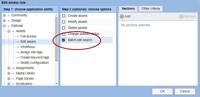
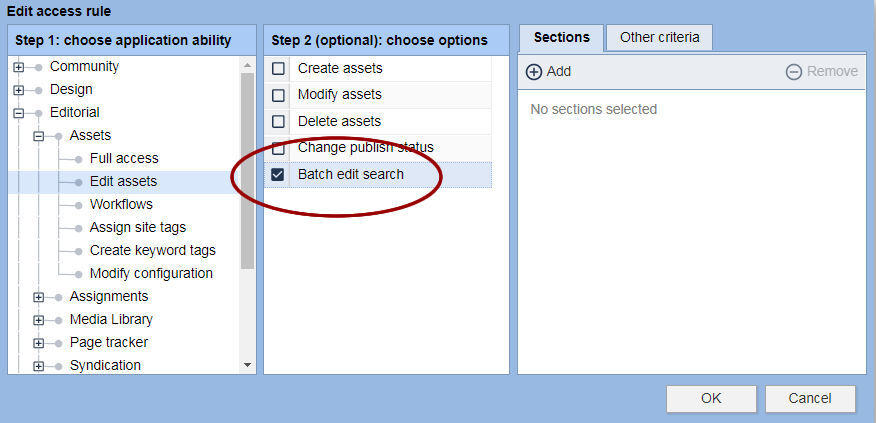
This new feature will be available automatically to all full "administrator" level accounts. For other group accounts, the new permission may need to be added to the group. It is available as an access rule under Editorial -> Edit assets -> Batch edit search.
The new "batch edit search" permission must be applied to a user group before members of that group have access to batch edit more than 25 assets at a time.