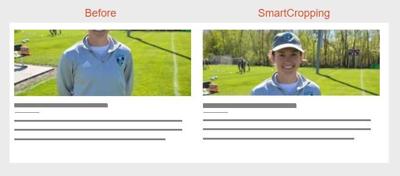
In this major release of BLOX Core, we are excited to introduce a powerful new add-on feature, Smart Cropping for BLOX CMS, which uses AI to automatically crop images for optimal display across devices. This release also allows system emails sent from BLOX CMS to be configured to include a From Name and From Address specific to your site, separate from the site's listed email address.
Smart Cropping for BLOX CMS
Optimize your visual content while eliminating the hassle and uncertainty of manual photo editing with the new Smart Cropping for BLOX CMS. This powerful add-on automatically and intelligently frames and enhances uploaded images, ensuring the best possible view for your audience.
By optimizing your photo displays with Smart Cropping, you'll not only captivate your audience but also boost engagement and click-through rates. Let your visuals shine and watch your reader interaction soar!
The best part is, you don't need any photo editing skills. Smart Cropping's sophisticated artificial intelligence (AI) automatically identifies the area of interest in each image, making it quick and easy for editors, photographers, and other content creators who regularly manage photos within BLOX CMS to consistently deliver high quality results.
Contact your sales rep for more information on this new time-saving tool! (TNCMS-554571)
ADDITIONAL FEATURES
For system emails sent through BLOX Digital, a From Name and From Address, separate from the site's listed email address, can now be set. This will apply for Subscription emails, forgot password, new account signup emails, and other system emails. (TNCMS-554701)
Our Site tags setting allows partners interested in sharing content with one another (hub sites & BLOX-to-BLOX sites) an easy way to copy that content. To improve upon this further, we're adding a new setting "Only overwrite content" that when selected will ensure sections, keywords, geotags, and flags are not overwritten when changes occur on the source site. (TNCMS-554534)
IMPROVEMENTS
We've made improvements to our archive sitemap to now populate automatically. Requests to build archive sitemaps will no longer be necessary. (TNCMS-7598)
Due to infrequent usage, we've removed the Dropbox option from the BLOX CMS admin. This improvement aims to streamline the storytelling process for all site admins by removing that extra choice/click during the edit process. Sites who wish to add Dropbox back can do so by Enabling Dropbox in the Site Settings. For more information, view documentation here. (TNCMS-554624)
We've further improved our External IDs feature to prevent asset duplication during the syndication process. (TNCMS-554725)
BUGS
Any asset that now is flagged with wire will not appear in the https://www.example.com/tncms/sitemap/news.xml sitemap. This change is to further meet compliance with Google News requirements. (TNCMS-554782)
We are also making infrastructure changes that should not be noticeable to admin or front-end users. If you experience any issues or have any questions, please contact customer support at (800) 293-9576 or BLOXDigital.com/support.