The Asset Library drawer has been entirely replaced with a new Asset Library search accessible from the Relationships drawer or from inline asset placeholders in the editor.
In this beta release of BLOX NXT (version 0.24.0), we’re introducing powerful new content management features, AI-powered editing tools, and enhanced asset workflows to streamline your editorial operations. Existing BLOX NXT clients can look forward to many of these features in the near future.
If you are using BLOX NXT and are interested in experimenting with these beta features, please contact Customer Support.
BLOX Digital AI Chat Assistant
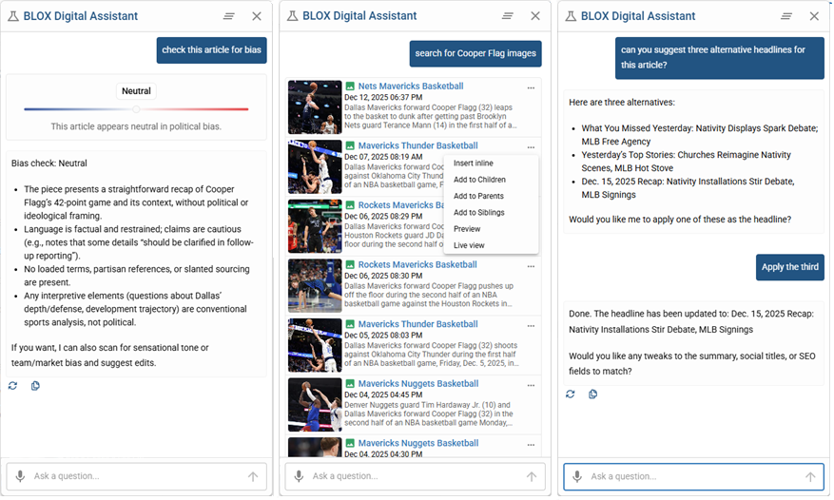
The BLOX Digital Assistant (Beta) is an AI-powered chat assistant embedded directly into the NXT editorial editing experience. Available on editorial create and edit pages, it provides writers and editors with real-time assistance for drafting, editing, analysis, and asset discovery—without leaving the editor.
The assistant appears as a persistent, movable chat bubble that supports both preset prompt buttons and freeform natural-language input, allowing newsroom staff to collaborate with AI while staying focused on their workflow. (CMSADMIN-1944)
In-Editor AI Chat – Access writing and editorial help directly inside the NXT editor via a floating chat interface.
Preset Prompts + Freeform Chat – Quickly trigger common actions or ask custom questions in natural language.
Writing & Editing Support – Generate suggested headlines, bullet point summaries, rewrite copy, check tone or bias, and refine language.
Intelligent Asset Discovery – Find relevant images, videos, and related content without navigating away from your story.
Persistent, Moveable Interface – Keep the assistant open while you work and reposition it as needed.
For more information on our BLOX Digital Assistant (beta), read our documentation.
Native spelling & grammar check
Content suggestions (Beta) provides real-time spelling and grammar correction directly inside the NXT editorial editor. As writers compose content, potential spelling errors are underlined in red and grammar issues in green, giving immediate, inline feedback without interrupting the writing flow. Editors can review and apply intelligent correction suggestions with a single click, helping reduce errors before publication while staying focused on their work. (CMSADMIN-1603)
Real-Time Inline Suggestions – Automatic detection of spelling and grammar issues as content is written.
Visual Error Indicators – Red underlines for spelling errors and green underlines for grammar suggestions, using familiar editorial conventions.
One-Click Corrections – Click underlined text to view correction options and accept, dismiss, or ignore suggestions.
Seamless Editor Integration – Suggestions appear directly within the editor, eliminating the need for external proofreading tools or context switching.
Admin-Controlled Rollout – Availability is for Beta clients only and an “Enable Content Suggestions” toggle in AI Settings.
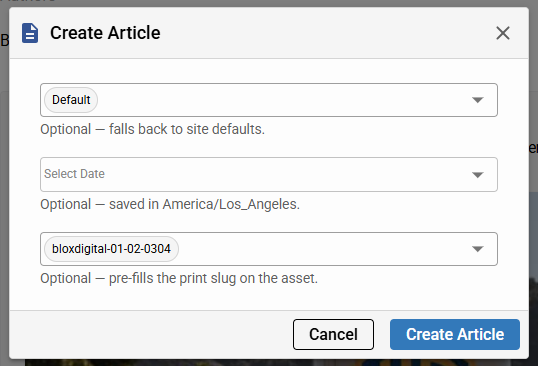
Pre-launch asset creation modal
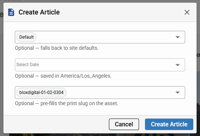
A pre-editor creation modal (Beta) is now available to streamline asset creation in NXT. When users create content from the global “+” or from Search → Editorial, a centered modal appears before the editor opens, allowing optional entry of workflow, start date/time, and slug. Once confirmed, the editor launches with these values pre-filled, reducing manual setup and helping editors establish intent earlier in the workflow. (CMSADMIN-1702)
Pre-launch asset creation modal that appears when creating assets from the global “+” or Search → Editorial.
Optional upfront metadata entry for workflow, start date/time (pre-scheduling), and slug. Skip to start blank.
Respect for user defaults for workflow and start time to ensure consistent creation behavior.
Availability across multiple asset types, including articles, images, videos, collections, polls, audio, links, and tables.
Controlled rollout, requiring participation in the Beta program.
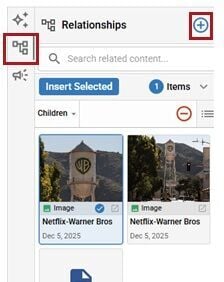
The Asset Library drawer has been entirely replaced with a new Asset Library search accessible from the Relationships drawer or from inline asset placeholders in the editor.
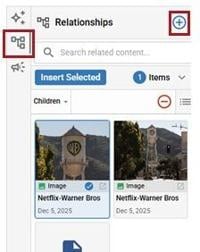
A new asset search modal (Beta) is now available, replacing the existing Asset Library drawer with a more robust, full-featured asset search experience. The modal can be launched from the Relationships drawer as well as from inline asset placeholders in the editor where users previously selected “Asset Library.” When enabled, the drawer-based Asset Library is removed and all asset selection flows route through this modal. (CMSADMIN-1982)
Dedicated Asset Search modal that replaces the Asset Library drawer.
Multiple access points, including the Relationships drawer and inline asset placeholders within the editor.
Advanced search and filtering across all asset types and access to Quick Filters for faster, more precise discovery.
Preserved actions such as inserting assets inline, adding them to relationship categories (children, parents, siblings).
Batch and individual asset selection to support efficient relationship and content management.
Batch edit options available from the modal to apply updates in bulk to assets before adding them to an asset.
Export Assets
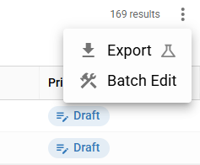
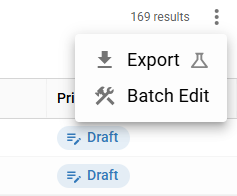
Asset export (Beta) is now available in NXT search results, bringing export functionality in line with legacy CMS capabilities. From search results, users can select one or more assets and use the new More button to export assets asynchronously. Export jobs run in the background, with progress and completion communicated through CMS notifications, allowing users to continue working without interruption. (CMSADMIN-1741)
In Asset search, you can now export selected assets by selecting the Export option from the More menu.
Asset export from search results, accessible via the new More button (replacing the previous tool icon).
Asynchronous, notification-driven workflow, with export status updates from Processing to Ready to download.
BPM/NITF export format by default, including searchable metadata such as title, sections, status, workflow, author, and timing fields.
Automatic 24-hour expiration for completed exports, with options to download or delete when ready.
Consolidated secondary actions, with Export and Batch Edit grouped under the More menu for clearer discovery. These will soon be migrated to the Notification Bell also included in this release.
Import Assets
Asset import (Beta) is now available in NXT search results, allowing users to bulk import assets by uploading BPM files directly from the New dropdown. When Import is selected, users can choose one or more BPM files and track progress inline as files are validated and processed. Validation errors are surfaced immediately, while successful files continue importing without blocking the workflow. (CMSADMIN-1742)
Bulk asset import from the New dropdown, providing a discoverable entry point alongside other creation actions.
Support for BPM file uploads, enabling migration, syndication, and large-scale content ingestion for BLOX-to-BLOX workflows.
Bell Notifications
A notification bell (Beta) is now available in the NXT toolbar, giving users real-time visibility into system and workflow notifications. The bell displays an unread count badge (capped at 9+) and opens a modal when clicked, providing a centralized place to view, filter, and manage notifications without leaving the current page. (CMSADMIN-1225)
Notification bell showing unread notification counts with automatic real-time updates.
Unread badge with overflow handling, displaying counts up to 9+.
Notifications modal that opens on click, listing all notifications in one place.
Filtering options to view All, Unread, or Read notifications.
Notification management actions, including marking notifications as read and deleting individual items
Initial rollout is limited to Batch Edit workflows, with planned expansion to additional processes including exports, imports, batch upload, KPI alerts, and BLOX Digital notifications such as release notes.
In this release we are making infrastructure changes that should not be noticeable to admin or front-end users. If you experience any issues or have any questions, please contact customer support at (800) 293-9576 or BLOXDigital.com/support.