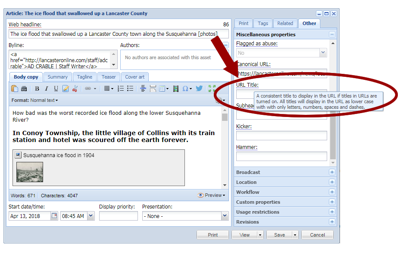
Customize the title as it appears in the article URL with the new "URL title" field available in this week's release.
When the "titles in URL" option is enabled, BLOX CMS takes the headline from the article and inserts it into the URL of the item. This accomplishes several important things:
When an end user encounters the URL—maybe in an email, text message, or perhaps just in the browser tab—the title in the URL helps users quickly understand what the story is about.
Because there are additional keywords in the URL, it may have more SEO benefits.
In some analytics systems, the URL is used to extract meaning or keywords without parsing the entire article.
Sometimes the headline on the article is not informational, and therefore provides none of these benefits to the URL. With this feature, however, an editor can customize the URL title and add more descriptive words.
For example, with the URL for a feature story like this:
That, obviously, has much more value to users and search engines, even mentioning "cystic fibrosis" which is a major theme of the article.
This new feature is available for any asset type, and can be found in the "Other" tab of the asset editor.
By default this new field is blank—which will defer to previous behavior where the article title is included automatically. Once filled in, it will continue to use the custom URL title (even if the headline is changed) until the URL title field is modified.
An editor can simply type into this field and the spaces are replaced by dashes when saved. Some characters (like punctuation) are not valid and cannot be typed in to the field.