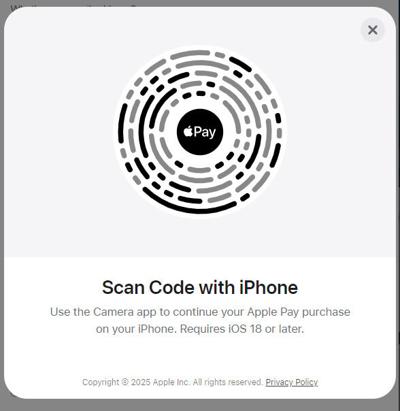
In this release of BLOX Flex BLOX-CMS Templates (version 3.271.0), we added Apple Pay support on desktop Chrome browsers through Audience+, enabling seamless checkout via QR code with an iPhone running iOS 18 (currently in closed beta). We also introduced new GAM Web Interstitial ad support, improved payment form messaging, updated Amazon TAM code, and fixed some bugs.
Feature Highlight: Audience+ Unlocks Apple Pay on Desktop Browsers
Big news! Apple Pay is now supported on desktop Chrome browsers for both Windows and macOS. That means users can check out with Apple Pay even if they’re not on an Apple device—making purchases smoother and faster for everyone.
Apple Pay now available on Desktop Browsers
🔧 How it works
When Apple Pay is enabled, the button will appear on the Single Page Purchase form in Chrome.
The user selects Apple Pay → A secure QR code appears → They scan it with an iPhone running iOS 18 → Boom! The transaction completes on their phone while the browser updates in real time.
🔍 Why it matters
This unlocks one of Apple’s newest innovations—cross-browser Apple Pay support—before many other platforms. Audience+ users can now offer seamless checkout experiences to desktop users with the convenience of Apple Pay.
Note: This feature is currently in closed beta and requires both Audience+ and Wallet (Premium Credit Card Updater). Interested in upgrading? Contact your sales rep or submit a support ticket. (FLEXBLOX‑10697)
More Features & Improvements
New GAM Web Interstitial Ad Setup The BLOX YieldUp advertising program now supports Google Ad Manager’s Web Interstitial ads for improved ad delivery and flexibility. Participating YieldUp partners can contact the YieldUp/Advertising support team if they would like to use this new position. (FLEXBLOX-10629)
Updated Payment Form Messaging We updated the user dashboard and payment form messaging for subscribers in a grace period to reflect their status more clearly, and to encourage payment updates. (FLEXBLOX‑10730)
Updated Amazon TAM Code Amazon Transparent Ad Marketplace (TAM) header-bidding tracking code has been updated with the latest implementation. (FLEXBLOX-10732)
Bugs
We fixed an issue where users could complete the purchase page without entering their first and last name, even when those fields were set as required. The form now properly enforces these requirements. (FLEXBLOX-10569)
Fixed an issue where Trinity audio was not functioning in BLOX Live e-Editions following a recent update. Trinity audio now works correctly in both editorial and e-edition contexts. (FLEXBLOX-10609)
Fixed an issue where the "Card: Showcase" block's hammer content would overflow and appear outside the block boundaries. Content now stays properly contained. (FLEXBLOX-10611)
We fixed a bug where the Single Page Purchase modal in Toast mode would not scroll when offer details exceeded the window height. The modal now scrolls as expected so users can view and select offer details. (FLEXBLOX-10681)
Fixed an issue where videos in the multimedia player were auto-playing even when auto-play was disabled. The player now respects the auto-play setting correctly. (FLEXBLOX-10684)
Fixed an issue where social share buttons in email newsletters were appearing at 100% page width instead of their proper icon size. (FLEXBLOX-10708)
We fixed a bug where touch gestures could stop working in the e-Edition viewer after repeated pinch‑zooming. The viewer now handles rapid zoom and pan gestures reliably, preventing the zoom level from getting stuck. (FLEXBLOX-10723)
We fixed a bug where keyboard shortcuts in the e-Edition viewer interfered with typing in the paywall modal. Shortcut keys like -, =, arrow keys, and page navigation keys are now disabled when a modal is active, allowing users to enter text normally and preventing unintended background interaction. (FLEXBLOX‑10724)
If you experience any issues or have any questions, please contact customer support at (800) 293-9576 or BLOXDigital.com/support.