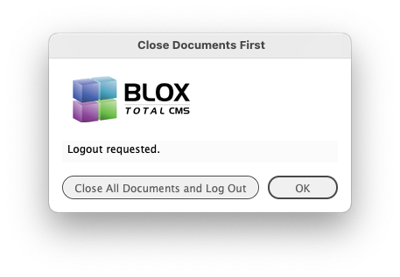
Starting with client version 5.57 if a user attempts to use BLOX Total CMS > Log Out... with documents open, they will now be prompted with a dialog that provides an option to automatically close all their open documents. In the past they were only provided a warning that the documents needed to be closed before they could log out.
Similar to the last version, this adds additional incremental changes to both Automated Production and Distributed Production.
macOS version 12.x (Monterey) sites have a new workaround installed to prevent it's incompatibility with the menu system.
Approved for use on February 15, 2022
The BLOX Total CMS client for Adobe InDesign and Adobe InCopy version 5.57.00-1 was approved for use by TownNews' Quality Assurance department on February 15, 2022. It is recommended for all Adobe Creative Cloud based sites. It may be downloaded using the adjacent link.
Logging out with documents open now prompts to close documents: In the past, if you attempted to log out while you had documents open, you would get an alert about the open documents but there would be no assistance in closing them or checking them in for Distributed Production users. This has changed and the dialog now has a button that allows all the documents to be closed. (INDESIGN-3562)
Starting with client version 5.57 if a user attempts to use BLOX Total CMS > Log Out... with documents open, they will now be prompted with a dialog that provides an option to automatically close all their open documents. In the past they were only provided a warning that the documents needed to be closed before they could log out.
macOS 12.x workaround: macOS version 12.x, also known as Monterey, and Adobe InDesign versions 2021 and 2022 (and perhaps earlier Creative Cloud versions) do not play nicely together. If they are used together the menu bar will be non-responsive. Users would be required to use BOTH mouse buttons to click on a menu. This behavior remains until the operating system opens an Adobe InDesign document. To help automate this process the client now includes a small Adobe InDesign document which is opened by the OS and then closed during an idle event. This happens when the user logs in to the BLOX Total CMS client for Adobe InDesign. If the user, cancels instead, the user will experience the aforementioned difficult menu behavior. Currently, we have tested with macOS up to version 12.2 and Adobe InDesign version 17.1. We hope Adobe will fix the issue. (INDESIGN-3573)
New feature for folio automation for Distributed Production: To greatly simplify the remote installation of the BLOX Total CMS client for Adobe InDesign in a Distributed Production Environment, we’ve added the ability for the Template Master, or IT staff, to upload any of the Add-Ons to Page Tracker for the remote user to automatically download. The Template Master will have a new BLOX Total CMS > Development > Add-Ons Management menu option with the ability to upload and download (for testing). For remote users, the download happens automatically if there are no Add-Ons installed. But remote users can also choose BLOX Total CMS > Update and Reset > Add-Ons… at any time. This is not part of Update All, but because the updating of the Add-Ons requires a quit of Adobe InDesign and that performs the same functionality as Update All. (INDESIGN-3603)
Uploaded Add-ons Added to Distributed Production Preparedness Testing: When Page Tracker version 1.18 is released, the BLOX Total CMS client for Adobe InDesign will automatically support checking for uploaded Add-Ons. The upload of Add-Ons, added in this version, allows for easier remote computer management and sites will want to use it. This is being reinforced by making it a requirement for distributed production. (INDESIGN-3611)
Image statuses internal function names: Client 5.50.01 modified the names of the internal functions that are used to provide the Image Statuses Shortcuts menu items. Those menu items are themselves optional, but some sites had added them and then assigned keyboard shortcuts to them without realizing what they actually pointed to – Image Statuses. When the 5.50.01 version changed the internal names, the keyboard shortcuts would file in Adobe InDesign whereas the menu items and Image Statuses itself would work just fine. The solution would be to use Settings and Support’s Replace Existing Shortcut Scripts in the Keyboard Shortcuts tab. Barring that, this version of the client allows for the outdated function names to be used again. (INDESIGN-3618)
Minor performance boost during launch: During routine testing, we noticed that some of the startup routines were getting called more than once. This has been fixed and the logging-in process within Adobe InDesign and Adobe InCopy will be a few milliseconds faster. (INDESIGN-3627)
Open by Status bug fix when opening multiple pages: During routine testing of the BLOX Total CMS client for Adobe InDesign, we noticed that attempting to open multiple documents using the BLOX Total CMS > Documents > Open by Status… dialog when in Normal Mode would only allow the first document to be opened. The remaining ones would display an incorrect dialog indicating that the document had been uploaded via Distributed Production. This has been fixed and the users can now open as many documents in an edition as desired. (INDESIGN-3633)
Change during launch for performance boost: Multiple recent changes have been occurring in the BLOX Total CMS client for Adobe InDesign to help eliminate the requirement for using either of the legacy folioProperties.jsx files. However, to support those legacy sites that haven’t yet been updated to use the built-in functions that those legacy files provide, the client still made calls to their internal functions. When they weren’t there, however, that caused an internal error that got trapped and caused a slight delay. Now, when the client is launching, it checks for the existence of those files before attempting to call the function inside. This should, for all sites that have removed those legacy files, provide a slight performance boost. It will, however, for those legacy sites that haven’t been updated, provide a slight lag. Take away: check out all the default folio properties and work towards removing your two folioProperties.jsx files. (INDESIGN-3638)
Behavior change for e-Edition cutout preferences: Page Tracker 1.15 allowed the e-Edition Cutout Preferences to move from an .XML file on the file server to the Page Tracker’s Application Settings. But, we had some sites that reported that the file was getting recreated. So we now check to see if the site is either a hosted site or a site with Page Tracker 1.15 and if so we no longer recreate that file when it is missing. This should prevent the default settings from overwriting the more desirable domain-based settings. (INDESIGN-3647)
Prior Release
The release notes for client 5.56.00-4 can be found here.