<&cachePull:()> is the second part of the ability to move text during translation. Its use follows a previous call to <&cachePush:()>. This <&cachePull:()> function is rather like <&insert:()> in that it allows items to be inserted, but what is being inserted is the contents of a cache. You can think of the cache like the host OS's clipboard. Except that there are a series of numbered clipboards/caches that can be used.
Function Details
The table below shows the details for the <&cachePull:()> function:
cachePull details
This table lists details on calling the <&cachePush:()> function.
The number for the cache to use. This would be any integer. For example, 0, 1, 2, etc
p2
-reserved for future use
p3
The optional paragraph to insert at. This overrides the use of the startTag, etc.
p4
The optional word to insert at. This overrides the use of the startTag, etc.
p5
The optional insertion point to insert at. Again, this overrides the tagging
Oddities of Using <&cachePull:()>
You can NOT use <&cachePull:()> in the same Translate Script command as the <&cachePush:()> because the Start Tag and End Tag that are used to find the text to move can't be subsequently located to push the text somewhere else. And the p3-p5 values are ignored if both a Start Tag and an End Tag is specified.
For <&cachePull:()> all 4 of the following tags have slightly different behaviors from most functions.
Tag
How is it used
Start tag:
Trigger for the translate script.
If <&cachePull:()> paramaters 3-5 are not included and if no `End tag:` is provided, the translate script runs a maximum of one time. As with normal functions, this tag will be removed from the text.
If any of the 3rd through 5th paramaters are included, the `Start tag:` will only be used as a trigger. It will be left in place in the text being translated. Thus, it would be common to use something like < as trigger.
End tag:
Allows the translate script to run more than once.
As with normal translations, when specified all the text starting with the start tag through the end tag will be replaced providing that none of the third through fifth paramaters are included.
If any of the 3rd through 5th paramaters are included they will be ignored.
Start tag replace:
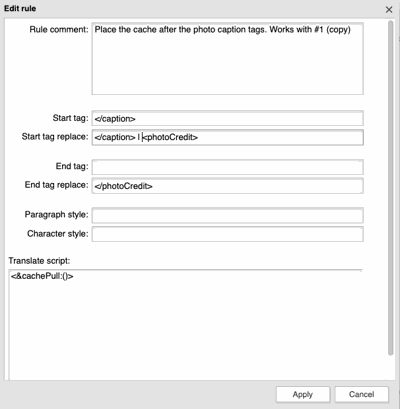
Will prefix the cached text with this text.
For example, if you wanted to move a photo credit and insert a pipe `|` before the credit, you should be able to place the pipe in the Start Tag replace field.
End tag replace:
Will add this this text as a suffix following the cached text.
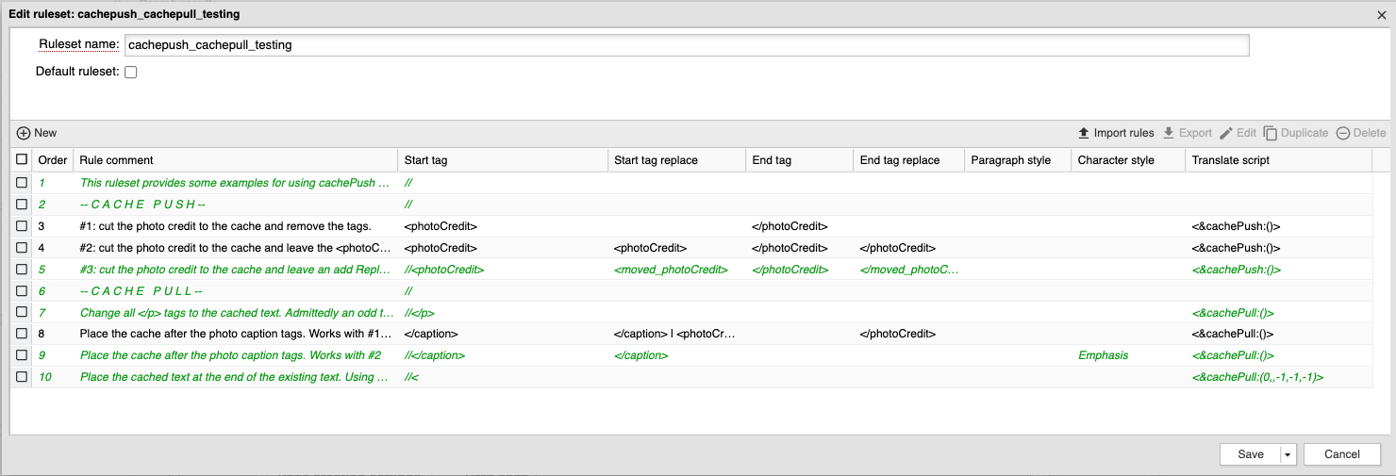
Sample to Move a Photo Credit
Assuming a photo credit has been placed on a stack, this will place it back in the same text frame after the photo caption.