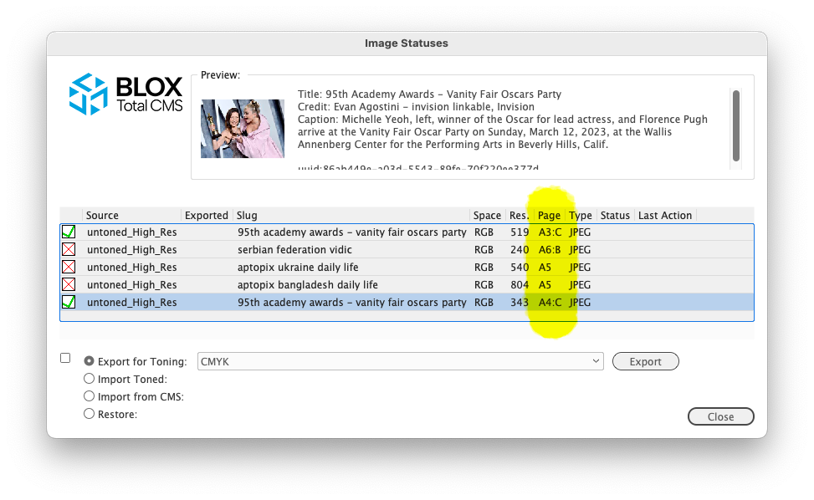
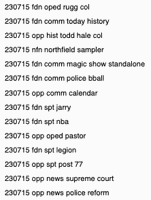
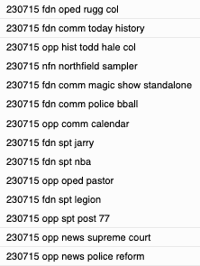
This version of the Image Statues dialog shows the color of a page with a :B (for Black and White) or :C (for CMYK/Color) suffix after the id of the page of each image. This information can be used by the users to help guide the export for toning.
Note: Images are presented in the order they were placed as opposed to the page order.
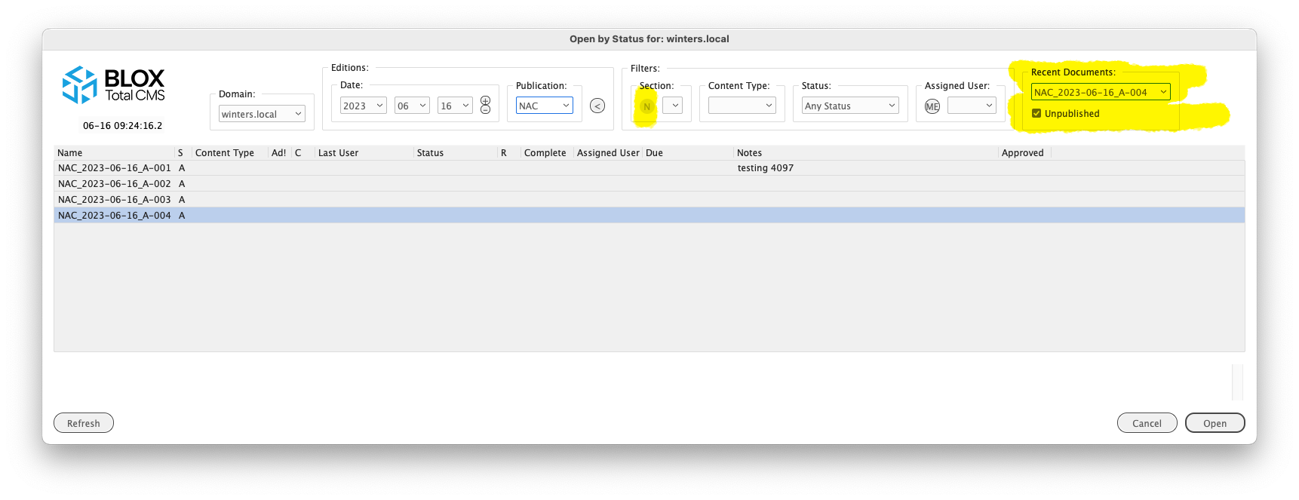
The Recent Documents area in the Open by Status dialog lists the last 24 documents opened by the user. They are sorted so the most recently opened is displayed at the top of the menu. Select one of the items in the menu and the rest of the Open by Status dialog's controls will be modified to match the selected document name. And then that document will be automatically selected and the OK button enabled.
The highlighted `N` is a quick setting to only display pages from the same section. It is one of the two options to mimic/replicated the legacy `Open Nearby` function.
This major release of BLOX Total CMS adds multi-page document support to our Distributed Production feature. This release also includes additional related features, improvements, and bug fixes. Of importance, there are some new translation features and related functions to allow sites to move photo caption text.
NEW FEATURES
Distributed Production split document: Unlike the legacy Combine With and Combine Multiple functions, there was no manual method to uncombine the previously combined documents with Distributed Production. There is now a BLOX Total CMS > Documents > Page Management > Uncombine Pages… function, which will unthread any jumps and return the pages to stand-alone pages. There are two known issues with uncombining: 1) The placed Editorial assets will be marked as being budgeted and not placed after the uncombine; 2) The uncombined pages can't successfully be used with Combine Pages again. (INDESIGN-4068)
Major new feature to automate passive budgeting: Page Tracker version 1.25, released 2023.07.11, includes Default Slugging for the domain and overrides for each publication. Since sites are very used to supplying a standard edition-based prefix to an asset's slug, this allows the Budget View to provide an edition-based search and allow the new Automated Production functionality to locate assets for an edition's pages without requiring sites to use active budgeting techniques. (INDESIGN-3734)
Passive Budgeting provides everyday users a quick way to locate assets for their publication.
Click the headline for details on configuration and using this important new feature.
Ability to ignore out-of-date links: BLOX Digital staff can now add a setting to any domain to cause it to ignore these links. Adobe InDesign will, however, show the out of date :warning: flag on any frame that is linked to a file that has been modified, but with the domain setting in place, the entire asset should not get marked as out of date, and thus, it would allow further editing and write-back. Since BLOX Digital cannot simulate this issue, implementing the setting could have other unforeseen issues. (INDESIGN-4147)
Change to creating new pages as a Distributed Production remote user: An earlier BLOX Total CMS client for Adobe InDesign version 5.66 change forced a revision for all remote users, creating a new document. That process displayed the Save Revision / Document Check-In dialog. It no longer bothers to show that dialog. If you need to set the ownership or workflow, that can be done in the New Document dialog, and you can change the Page's notes by using BLOX Total CMS > Documents > Set Notes of All Pages… The lack of dialog now makes this process faster. (INDESIGN-4023)
New hundred folder ad number sharding option: In the past, the hundred folder ad sharding would use the last two digits of the ad number unless a v or _v was included in the ad number to represent the version number of the ad. So an ad number 123456_v02 would be expected in the 56 folder. Now, a setting can be turned on to use a hyphen to separate the ad number from the ad version number. This new setting would scan an ad number like 987654-03 into the 54 folder. Submit a customer support ticket to request this setting. (INDESIGN-4119)
New advertising function to open existing _BU document: We've added a shortcut for the Advertising staff who uses the BLOX Total CMS > Documents > Advertising > Create Edition from Edition file… feature. This new option to Open Recent _BU Document... allows them to quickly re-open any unsplit backup file they recently created. They might want to do this to rearrange the ad positions and then use Override .adinfo to send that to Page Tracker to update the pages without recreating the edition. This new feature is slightly faster than creating a new edition. In addition, this is particularly handy for Distributed Production users who don't have access to open files from the file server or local workstation. (INDESIGN-4089)
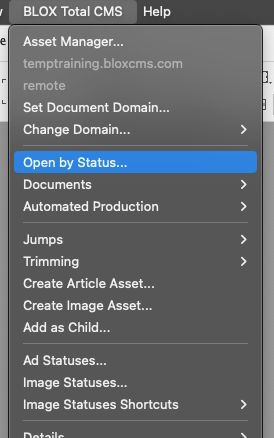
New Open by Status in same section: There is a new icon N in Open by Status to the left of the Section menu. When a document is open, the user can click this icon and the section menu will be changed to match the section of the top/frontmost document. This replicates an experience similar to Open Nearby for sites segregating documents by section. But this also hides documents from different editions, whereas Open Nearby, unfortunately, would have shown them. (INDESIGN-4092)
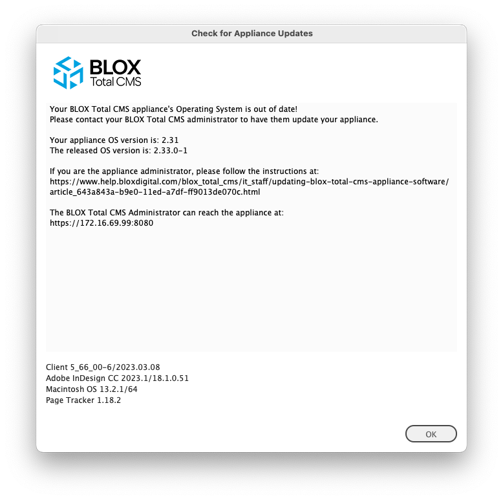
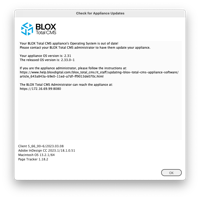
New feature to Check Appliance OS Versions: Users connected to appliance-based BLOX Total CMS can now choose BLOX Total CMS > Update and Reset > Check Appliance Version... to determine if the current appliance OS is outdated. In addition, appliance-based users will now be occasionally warned when connected to out-of-date appliances. Sites with users getting this warning should update their appliances. Information Technology administrators should be doing this, but many fail to make it a priority to keep them updated. Out-of-date appliances risk the site's security and limit BLOX Digital's ability to resolve problems during an emergency. (INDESIGN-3541)
This dialog shows a sample of the warning that appliance based BLOX Total CMS sites can begin seeing if they don't keep their appliances current.
Major new Translate Script function: Template Masters now have a significant new tool to add to their arsenal for formatting text. The BLOX Total CMS client for Adobe InDesign and Adobe InCopy can now move text within an asset. A common desire is to move the Image Asset Credit/Byline after the Image Caption. Note, if this is the only thing you want to move, and if you always want to move it, BLOX Digital can enable a feature on a domain-by-domain basis to move those two. But if you only want to move them in print occasionally, you can use this new function.
Auto export for toning with image placement for Automated Production: Sites with Automated Production enabled will now have the option of causing the placed images to be automatically exported for image toning based on the page color. This requires that Page Color tracking is turned on. Submit a customer support ticket for more information about this setting. (INDESIGN-4034)
New translation option for Image Cutline/Credit Ordering: Historically, when translating an image asset, the text for the photo credit always comes before the photo caption. Submit a customer support ticket to request this setting, and on a domain-by-domain basis, the photo credit can follow the photo caption. Besides the change to the setting, you will also need to adjust the rulesets for the domain to expect the different order and format accordingly. (INDESIGN-4029)
New option to translate non-assets: If a site has a ruleset named Non-Asset, a new menu Translate Non-Asset option will appear with the Create Article Asset... and Create Image Asset... functions. When chosen, the function will run the designated ruleset on the text in the selected frame — the same as the legacy function but with the change that starts in the new ruleset. Additional information can be found here. (INDESIGN-4035)
IMPROVEMENTS
Change to Distributed Production Remote User temporary directory purging: Client 5.65 added a feature for Remote Distributed Production users to purge their workstation's temporary directory. That version, however, had a minor bug that caused it to stop working if an item it found had no modification date. An error would be logged, and no further purging would likely ever happen. This appears to have been solved. (INDESIGN-4165)
Removed self-updating option: The ability for the client to update itself has been removed until it can be fixed. A Template Master set for auto-checking for updates will still enable that function. But the update itself cannot be triggered from it. Users will get a dialog explaining that an update is available. (INDESIGN-4169)
Named support for Adobe InDesign version 18.5: Adobe released Adobe InDesign Creative Cloud version 18.5. Unfortunately, that wasn't an expected version number, and the version information would appear incorrectly in the Settings and Support dialog. The only adverse effect was that the Spawn Template feature would show the word undefined versus the Master Page or Parent Page. We now support this version completely. (INDESIGN-4158)
New folio text variable for range of dates without days of the week: There is a new R0 (zero) Folio Text Variable for an automatic publication schedule-based date range. This R0 value is in the same date range as the R-value released with client 5.65, but this version doesn't include the days of the week. It was added to replicate what we already do with Monthly and Yearly publications where no day of the week is included. (INDESIGN-4153)
Modification to opening Distributed Production documents: A change was made to the document opening process to remove an incorrect dialog that could appear when documents opened but had improper links. (INDESIGN-4146)
Modified servers.jsx verification for Distributed Production: We have Development Mode functions to configure the servers.jsx file for Distributed Production at BLOX Total CMS > Development > Add Distributed Production to Servers.jsx..., it is possible to edit that file and manually put in the wrong values. Unfortunately, the login process did not adequately validate the entries, and the users could think they were choosing a Distributed Production option when, in fact, they were logging in as a legacy Normal user. This has been changed. Users will be warned if the jsx file is incorrectly configured for a distributed production. (INDESIGN-4150)
Modifications to Multi-page document check-in for Distributed Production users: A prior feature for version 5.66 of the client added the ability to work with multi-page documents for Distributed Production via the BLOX Total CMS > Documents > Page Management > Combine Pages... feature. We originally created a package of the entire document for safety purposes for each page. We will now reuse the original package. This improves the performance of the Check-In and Save Revision processes. (INDESIGN-4142)
Distributed Production ad statuses improvement: We changed some internal test conditions when opening documents in a Distributed Production Local or Remote mode that could have caused ad statuses not to run automatically. The situation would only affect users who were not the first user to open the document in a Distributed Production mode. This issue also affected the use of the flag Out of Date. That function, however, automatically runs frequently and thus isn't as important. (INDESIGN-4143)
Support for Adobe InDesign Creative Cloud 2024 and macOS: We've added the necessary changes so that the macOS menus will remain responsive when Adobe releases Adobe InDesign Creative Cloud version 2024. No change was needed for Windows. (INDESIGN-4136)
Minor update to logging of output: We now log some additional information to help determine how long it actually took for an output to happen. This indicates how long the pure output took and is separate from how long the idle tasks, like checking in assets, are taking. In addition, the Slow Line Finder now aggregates this information. (INDESIGN-4138)
Internal menu change: Modified an internal setting affecting the ordering of some menu items. It would be rare for a user to notice the change. (INDESIGN-4135)
New Ad Organization method: We now support five different organization methods for sharding/segregating ad image files. The latest is by a fully dated folder in the pattern of Year, Month, and date with this pattern: YYYY-MM-DD. Similar to the 01-31 folder organization, the date is determined by the Edition date of the pages/documents. If you would like to organize your ads this way, submit a support ticket at support.bloxdigital.com. WARNING: Many sites are still using legacy folioProperties.jsx and dateBasedFolioProperties.jsx files that could have an alternate definition of the D2 value for the folio text variables. We now rely upon the built-in D2 value to speed up the advertising functions rather than reconstitute it. But this could change the name of the folder when using this option. In general, those legacy .jsx files shouldn't be needed. (INDESIGN-4132)
New advertising percentage in the Edition Report: With Page Tracker version 1.25, the reports available within the BLOX Total CMS client at BLOX Total CMS > Documents > Create Edition Report... will now include the percentage of the page that is advertising if a domain's Page Tracker Application Settings > Advertising > Page Tracker options are both checked. The values will range from 0 to 100. (INDESIGN-3726)
Improved copy fit and head fit functionality: If the site hasn't loaded the proper ruleset that lists the style information, the menu items will be disabled. (INDESIGN-4110)
Path changes for Distributed Production: To prevent issues with subpaths for images and articles (and maybe other links), we will no longer allow Windows-mapped drives to be used as base paths in the browser-based Path Configuration dialog when logging in as a Distributed Production Local user. To prevent issues for sites migrating, the Distributed Production Preparedness Test will also flag this problem. (INDESIGN-4125)
Output logging change: An issue where the Translate.log file failed to list information has been fixed. It now logs that if image downsampling is turned off. (INDESIGN-4126)
Translation change affecting inline assets at the end of the article: We've changed how inline assets are translated when placed at the end of an article asset. Previously this location wasn't allowed. Now you can locate inline assets at the end of an article. (INDESIGN-4127)
Additional methods to prevent the use of Document Jumps with Distributed Production: Attempting to use Document Jumps with Local or Remote mode would cause the pages to become permanently out of date. (INDESIGN-3371)
Minor change to Open by Status: The time stamp in the Open by Status now displays when Page Tracker was last polled for information. This is important because if you are waiting for a change, you might have to click the Refresh button to get an updated list of all the page's statuses. (INDESIGN-3924)
Distributed Production change with Check Out All: There is an existing BLOX Total CMS function to allow automatic checking out assets when opening documents. This was put in place when the only way to advance the asset workflow when finishing the page was by having the BLOX Total CMS client request the workflow promotion via the optional output functionality. That limitation disappeared years ago, but some sites still enable Auto Check Out, which hurts their performance when closing and/or outputting pages. It will now be more difficult to turn on this feature and keep it on to improve user performance. (INDESIGN-4077)
New confirmation for uploads for Distributed Production and disaster recovery: The Development Mode uploads for Folio Text Add-Ons, Image Toning Preferences, Jump Items, and Output Preferences now have intermediary confirmation dialogs that list the type of upload, the file(s) being uploaded, and the domain being uploaded to. This prevents a user from attempting to update one type of item and accidentally getting another, which is common with image toning and output preferences. This is also important because these items can't be removed or uploaded. (INDESIGN-4120)
Additional security precautions for checking uploaded Add-Ons: An earlier version of the client allowed for the upload of Add-Ons for easy/automatic installation for the Remote Distributed Production users. That upload checks for terms in the Add-Ons that could be a security risk. That checking has now been expanded to additional terms and runs on the remote users' download. (INDESIGN-4001)
New option to Open Recent in Open by Status: A new set of controls in Open by Status allows users to quickly re-open the last few documents they had created or opened in BLOX Total CMS, providing they are using the approved methods to open documents. (INDESIGN-4015)
The Recent Documents area in the Open by Status dialog lists the last 24 documents opened by the user. They are sorted so the most recently opened is displayed at the top of the menu. Select one of the items in the menu and the rest of the Open by Status dialog's controls will be modified to match the selected document name. And then that document will be automatically selected and the OK button enabled.
The highlighted `N` is a quick setting to only display pages from the same section. It is one of the two options to mimic/replicated the legacy `Open Nearby` function.
Disabling the ability to switch domains with incorrect setup: For sites that don't have Page Tracker Application Settings Event Handler's Miscellaneous option for Process Application Activations chosen, the Domain controls in the BLOX Total CMS menu and in the Open by Status dialog will be disabled. A user with documents open from multiple domains couldn't switch domains automatically. So, this makes it harder to get documents from other domains open. (INDESIGN-4053)
Change to Distributed Production preparedness testing: The Distributed Production preparedness testing now verifies that the Page Tracker Application Settings Event Handler's Miscellaneous option for Process Application Activations is checked. Without this, a user wouldn't be able to switch domains automatically. (INDESIGN-4053)
Updates to slow line finder: The Slow Line Finder in Settings and Support's Support tab provides a simple method to check whether an individual workstation or network provides subpar experiences. It is also a useful tool for customer support to quickly look for problem areas. Previously, the tool only compared the time between the user's log lines and flagged those differences greater than three seconds. However, the process skipped logging those items that were internally time-measured. Those summary times are now added at the bottom of the report, and it can provide a more complete accounting of the time to output a page, for example. (INDESIGN-4076)
Automation for Local Mode documents not yet in Page Tracker before Combine Pages: For pages created in Normal Mode and wish to be combined in Local Mode, the client will automatically check those documents to Page Tracker to combine them. This change also enables Combine Pages for Local mode, but Uncombine Pages is not a Local mode option. (INDESIGN-4082)
Modified support for Miles 33 Ad Layout Format: We have modified our support for Miles 33-based XML edition files to the new file format received in 2023. Ultimately, what is different is that we now expect the ad positions to be measured from the bottom left of the page rather than the top left of the page. (INDESIGN-4133)
Improvement to Opening Distributed Production Documents: We have had reports from a couple of our Distributed Production sites that, on rare occasions, the Adobe InDesign documents will open with one or more of the file links to the article assets marked as missing. To help prevent this, if any of the asset's InCopy Markup links are missing, the BLOX Total CMS client for Adobe InDesign will attempt to recreate the links before the document check-in. (INDESIGN-4099)
Close all documents in remote mode Enabled: Remote Distributed Production users now have the option to use BLOX Total CMS > Documents > Close All... Like the legacy function of the same name, the users will not be prompted, but all documents will be checked into BLOX Total CMS for other users to use. (INDESIGN-4093)
New options for Check-In All documents in Remote Mode: Remote users will find a new Check-In All... option to check all open documents. The users will be prompted with the same Check-In dialog as if they were closing each one individually (INDESIGN-4093)
Client update improvement: We found that a site can remove the NextVersion folder after launch, which would cause the semi-automatic update process to fail. If the folder has been removed, it will be returned, and the update process can continue. (INDESIGN-4080)
Open by Status UI change: The width of the Open by Status dialog has been changed to show more of the data columns. It will, if needed, be extended to nearly fill the full width of the user's screen. (INDESIGN-4083)
Speed enhancements for creating Distributed Production pages: When creating individual pages using either Distributed Production mode, the process now happens quicker as fewer background events happen. The behavior is both measurable and noticeable to users. (INDESIGN-4086)
Behavior change when creating pages with Creating New Pages in Remote Mode when existing pages are open: To prevent any potential issues with document locks, if a Remote user has pages open, they will be closed (and not checked in) before the new document is created. Then, those closed documents will be reopened one at a time. Finally, the new document will become active but usually appear as the leftmost tab. Since most Remote users do not create new documents, this change will not affect many people. (INDESIGN-4086)
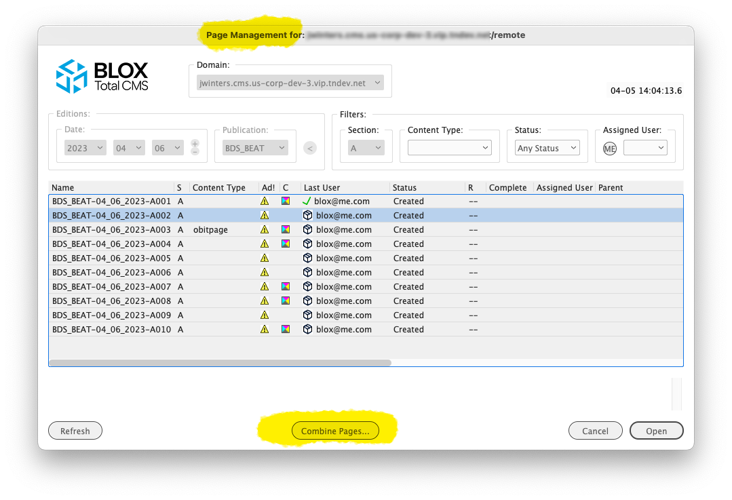
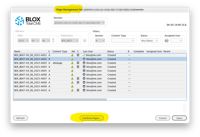
Distributed Production remote users can build multi-page documents: This release allows Distributed Production remote users to combine pages to produce a multi-page document. The process works similarly to the legacy BLOX Total CMS > Documents > Combine With. The user will open the main/first page and then choose BLOX Total CMS > Documents > Page Management > Combine Pages... They will then have a dialog that looks like Open by Status but has a Combine Pages... button at the bottom that can be used to combine a single document. This functionality is enabled only for Remote users. It is disabled for Local users at this time. (INDESIGN-3073)
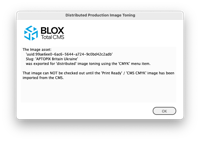
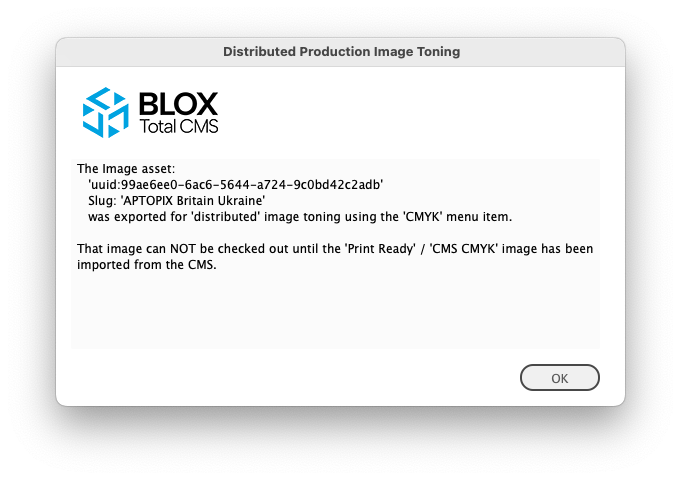
Important new Image Toning Option for Distributed Production: Client 5.52, back in October of 2021, added a feature to allow an Adobe InDesign user to export images to the hosted server's data feeds folder. This was designed to allow remote users to export images for toning. The site would need to monitor that folder via FTP; when an image appears, they can tone it using any method they desire. Around the same time, a different feature allows a different data feeds folder to be monitored by BLOX Total CMS and can auto-import images the toned, print-ready images to the original asset. That feature required that the asset not be locked by any user. So when exporting to the hot folder using that method, the image asset is automatically checked in on the Adobe InDesign page/document. A new feature prevents it from being checked out until Image Statues has imported the toned copy from the print_ready version. That feature will display a warning dialog similar to the one shown below. Then, after acknowledging the dialog, the Image Statues dialog will be opened with import from CMS choice automatically selected. (INDESIGN-3252)
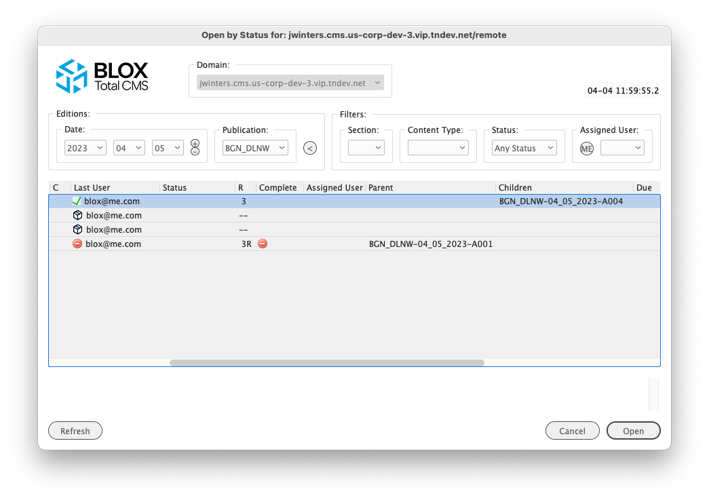
Open by Status parent and children columns for Combined Pages: Distributed Production users will now have two new columns: Parent and Children, as shown below. These show the names of the documents that hold other pages. The main document would be considered the parent, and the combined pages would be the children. Thus, if A4 is added to A1, A1 has a child of A4, and A4 has a parent of A1, as indicated in the image below. If additional pages are combined, the Parent will be populated, but the Children field will display a counter indicating the total number of pages. (INDESIGN-3326)
Removed domain menu from Open by Status for local users: Due to unforeseen behaviors with closing inactive documents in Local mode, the Domain menu is now limited to non-Distributed Production users and Distributed Production users in Remote mode. (INDESIGN-3996).
Distributed Production remove or restore page: Users can now both remove or restore an uploaded version of a page. Like with the Open prior Revision function, this new feature can be found in the BLOX Total CMS > Documents > Page Management menu. This allows a normal user to build a page in an office outside of the Local mode and combine pages while waiting for that feature to be added. (INDESIGN-4022)
Open by Status UI change: The width of the Open by Status dialog has been changed to show more of the data columns. It will, if needed, be extended to nearly fill the full width of the user's screen. INDESIGN-4083
New Distributed Production output improvement: After completing the output, the output preferences have long supported an option to close the Adobe InDesign document. This has now been extended to do a Distributed Production Check-In using the same <closeWhenComplete>true</closeWhenComplete> tagging, providing that the document is a single page document and the user is remote. In other cases, the document will close to match the original definition of the feature. (INDESIGN-2866)
Image Statuses dialog improvement: As part of the ongoing improvements to the Image Statuses functionality, the Image Statues dialog will now display a page color suffix after the page's name. For example, if page A7 is a Color page, the Page column would list the page as A7:C. A Black and White page will have a: B suffix. Sites that have not enabled page color tracking or pages without an indicated page color will not show any suffix. The Page Tracker Application Settings' Output and Segmenting accordion's Track Page Color option controls the ability to determine page color. When selected, images on the pasteboard will not be included in Image Statuses. (INDESIGN-3259)
This version of the Image Statues dialog shows the color of a page with a :B (for Black and White) or :C (for CMYK/Color) suffix after the id of the page of each image. This information can be used by the users to help guide the export for toning.
Note: Images are presented in the order they were placed as opposed to the page order.
Behavior change for closing Distributed Production documents in Local Mode: If you are using Distributed Production in a Local Mode and attempt to close a document that isn't active, it can prompt you to save changes but will no longer trigger the check-in if that document is from another domain. The recommended practice is to activate (bring to the front) any document you want to close. (INDESIGN-3996)
Modification to Spanish Folio Text Variables: Spanish folio and range (F and R) folio text variables now preface the month and year with the word `de.` For example: `15 de octubre de 2023`. (INDESIGN-4044)
Spanish and French language development mode passphrase: In our continuing march towards better support for foreign languages, the Development Mode now supports French and Spanish versions of our standard development mode passphrase. To know when to use it, ensure the BLOX Total CMS > Language > menu is correct. (INDESIGN-4041)
Spanish Language Text Variables for Dates: The BLOX Total CMS client for Adobe InDesign can now generate folio text variables using Spanish word-for-date components. Submit a customer support ticket to request this setting. At this point, it makes all date-based variables in Spanish. A future change will allow individual publications in Spanish for French. (INDESIGN-4042)
Progress bar added when checking in multiple pages for Distributed Production: A progress bar appears when checking multiple pages. Generally, the only time that should appear is when the advertising staff checks in multiple pages from creating an edition. (INDESIGN-3311)
Distributed Production edition check-in enhancement: For sites using Distributed Production, there is a new, faster method to check in all the pages of an edition. Now a user can choose BLOX Total CMS > Documents > Advertising > Create Edition from Edition file... and then follow it up by BLOX Total CMS > Documents > Check In... The user will get prompted if they want to create and check in all the pages of the entire edition. (INDESIGN-3320)
New Distributed Production options to open prior revision of page: There is now an option for Distributed Production users at BLOX Total CMS > Documents > Page Management… where a prior revision of a page can be opened. This has been added for disaster recovery purposes, though none of our existing Distributed Production sites have needed such a feature. In the future, additional Page Management functions will be added here, including combining pages. (INDESIGN-3361)
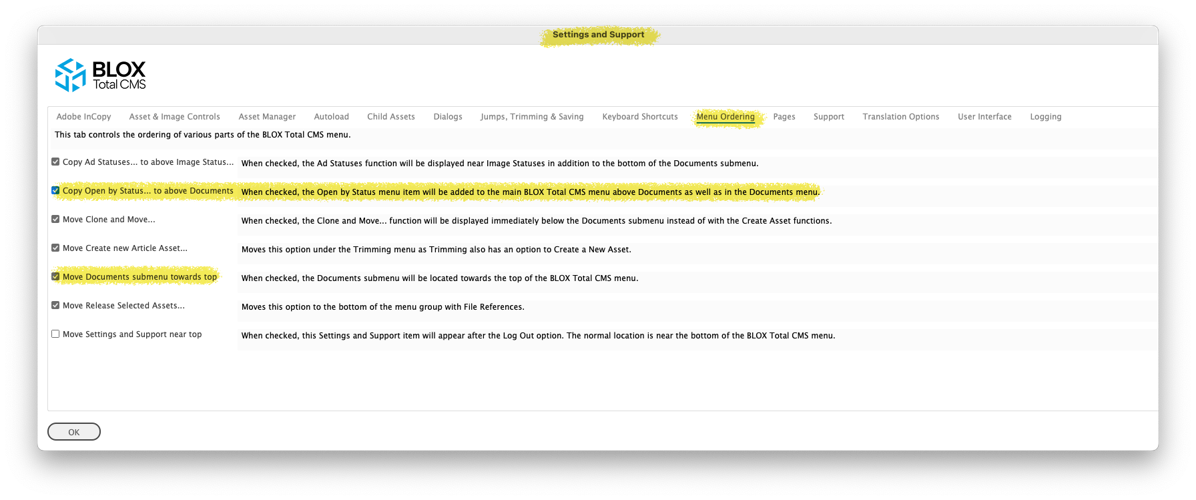
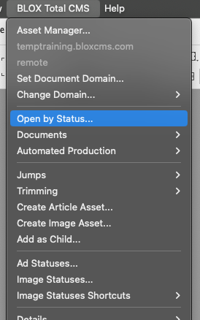
New option to display Open by Status at the top level of the menu: Since Open by Status is the designated way to open documents in the future, we're adding an option to display it at the top level of the BLOX Total CMS dialog. To choose this option, select BLOX Total CMS > Settings and Support… Then click the Menu Ordering (MO) tab and select Copy Open by Status... to the above Documents. Click OK, and an Open by Status option will be above Documents. (INDESIGN-3361)
Page color labels are now required for Automated Production: Sites using Automated Production must turn on Page Color Labels. This facilitates marking the page color and thus allows for the option to import the correct print-ready image. (INDESIGN-4033)
Distributed Production option for ads: If you are using Distributed Production, your Remote users will now be prompted with Ad Statuses if your site uses it when checking in the document if the page has already reached the penultimate or last workflow processes. If this process is problematic, it can be disabled by disabling the Send Ad Status to Page Tracker option in Page Trackers' Application Settings in the Advertising accordion. (INDESIGN-3335)
BUG FIXES
Bug fix for menu options when trimming is disabled: An issue was discovered that if Trimming was disabled for a domain, several other menu options were also disabled. This has been corrected. (INDESIGN-4035)
Inline notes bug Fix: An issue where an article asset was edited and it was left with two notes separated by any white space, the white space was swallowed into the adjacent notes. This has been corrected. Note, however, that your site might have ruleset rules that add spaces around notes. Those rules should not be needed any longer. (INDESIGN-4106)
Bug fix For closing documents from alternate domains: An issue where if multiple documents are open from multiple domains, it is possible to click the document close icon (an x in the document's tab), and the document will attempt to close without switching to the document's domain. For many sites that share document storage, this isn't a problem. But for Distributed Production sites, this can cause the upload to fail because it would want to upload to the wrong domain, and since the naming convention might not match, the upload could fail. (INDESIGN-3996)
Important bug fix for Multi-Domain sites: A prior version of the client broke the ability of the BLOX Total CMS client for Adobe InDesign to switch domains when switching documents. This has been fixed. (INDESIGN-3996)
Modified reaction to updating rulesets: An issue with rulesets not initially loading or processing has been fixed. The main BLOX Total CMS menu will be recreated to show the ruleset-enabled options when the rulesets are updated. (INDESIGN-4110)
Bug fix for the G Text Variables: The G text variables were incorrectly setting the numbered digit versions, e.g., G1 G2. Instead, they matched the G value. These values are typically only used inside custom output naming functions because they will always be the same within an individual document. Nonetheless, they were wrong, and now they function as described. (INDESIGN-4026)