We are very excited to announce this new version of BLOX CMS Core software, which adds new Article Designer features. Editors will be able to drag and drop assets inline and style them to create a more integrated storytelling experience. In addition, there is a new webservice for front-end asset management, and a batch upload button included on collections and on the article "related" tab.
FEATURES
Article Designer tools and inline assets
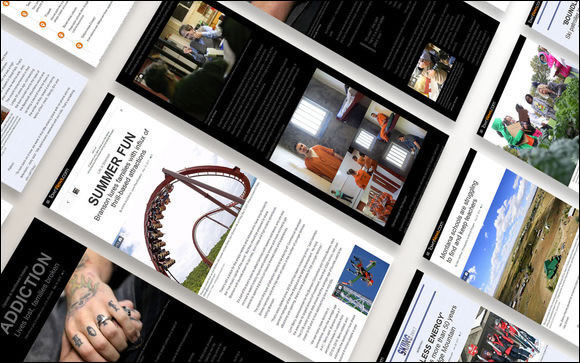
The new Article Designer tools provide the ability for your newsroom to create better stories by arranging inline elements in the best way for the story.
Inline asset styles have been added to the article tools. Now, once an asset has been dragged and dropped into an article, it can be double clicked to reveal an "inline assets style" panel. At this point, width, alignment, or style may be chosen. Style options are different on a per asset basis. (TNCMS-5391)
Sibling and parent related assets can now be dragged and dropped into an article's content in order to create a better article design. (TNCMS-5414)
We are now adding the ability to add quotes, info boxes, etc. to an article as inline elements to help create a storytelling experience. (TNCMS-5417)
Template support has been added for a default inline asset display which can be called in the templates as inline.default.html.utl. (TNCMS-5431)
Syndication support for inline assets
In order to support the Article Designer changes, the syndication process has now been updated to better support inline assets and their styles.
Inline sibling assets: Inline sibling assets were previously not syndicated. After this release, siblings that are inline will be transformed into a in-story link back to the original source website. This allows the origin website to benefit from links back to their site. They origin website will get additional traffic due to the in-bound links and an SEO boost.
Inline asset children: Children assets will continue to syndicate along with their parents. If they are inline, the inline placement and styles will travel to the new site along with them (and will continue to link to content on the destination site).
Batch upload available in more places
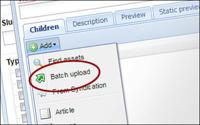
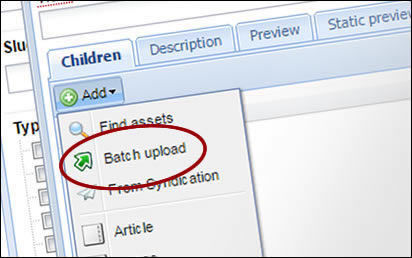
The ability to batch upload binary files into BLOX CMS has been added to the related content tab and the "add items" area of a collection. This should reduce the amount of time it takes to upload a photo gallery or another series of assets. (TNCMS-5440)
Front-end performance improvements
We are adding new capabilities which will help improve performance on the front end:
The cms.page.add_script module now supports two new options. The "async" attribute will add "async" to the Javascript call. The "defer" attribute will automatically be disabled if both are used. It also adds the "onload" attribute which tells the Javascript code to run as soon as the script loads. (TNCMS-4176)
The <noscript> version of Google Tag Manager has now been added, along with support for capturing server-side GTM variables in the payload. In addition, this will be added at runtime to just after the <body> tag. (TNCMS-5456)
We are adding an optimization to cut down on connect time, which is to inform the browser to preconnect to the CDN end-point via resource hinting. (TNCMS-5492)
CDN references will now always be loaded with SSL/HTTPS (secure mode). This will work whether or not sites have migrated to "secure mode" for their whole site. (TNCMS-5526)
We are adding the ability for scripts and CSS to be preloaded using the W3C preload specification. The cms.page.add_script and cms.page.add_css modules now gain a "preload" attribute which, if provided, will add a link HTTP header with a directive to preload the script or CSS file in question. This will be included strategically in core templates in an upcoming release. (TNCMS-5071)
More flags in BLOX Go
All available flags are now able to be set via the BLOX Go mobile reporting interface. This will help mobile journalists in the field categorize breaking, top or other news. (TNCMS-548886)
New REST-based webservice
Support for a front-end asset management webservice that would allow for a REST-based for creating, updating, and deleting editorial assets has been added to the system. (TNCMS-5402)
CHANGES
Yahoo OpenID will no longer be a default option on the Federated Authentication user panel. (TNCMS-5008)
BUG FIXES
Removing from an article a child asset that has been embedded inline in the article content will now also remove the inline placeholder. (TNCMS-4252)
Previously, followed notification emails were sent for stories that were posted on the current day, but did not send a notification for stories that were posted the day before. Now, alerts will still be sent at 9 am, however they will send updates for any story posted since the last notification email was sent. (TNCMS-4913)
The use of the class attribute in the NITF parser has been switched to use the name attribute. (TNCMS-5380)
Fixed an edge case where some exports which shared images would not retain images on import. (TNCMS-5398)
In the article asset editor, inline asset placeholders for assets which do not exist will now display an error reflecting their failure to load. (TNCMS-5432)
Inline business assets will no longer show a "Loading..." message when added to an article asset. (TNCMS-5443)
Changing an email address on a BLOX user account will now let that email address be used more quickly in another account. (TNCMS-5486)
Unknown users (such as the BLOX CMS system) are no longer listed as "undefined" in the "Last modified by" field in the asset manager. (TNCMS-5500)
For AP channel items syndicated into BLOX CMS, there were some edge cases where previews didn't display. This has now be fixed. (TNCMS-5603)