🚀 Leap into the AI-powered future of content management.
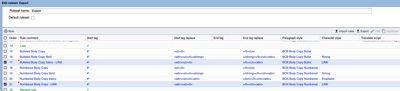
The two highlighted lines show adding support for the default `LINK` Character Style. Since 2019 if sites didn't have a Character Style indicated in their `hyperlinks` ruleset, a style named `LINK`(all caps) would be added to work past a bug in Adobe InDesign with regard to finding hyperlinks.
For years prior to that, we required that if lists were to use Character Styles for formatting within links that those styles get added with <wbr> tags to permit the Adobe InDesign or Adobe InCopy formatting to be returned to BLOX for online display.
Those same <wbr> tags are now necessary for URL write-back within lists.
Check your rulesets for the name of the character style being used. It might not be `LINK` as shown here.
This is a focused release on changes to asset write-back. It includes bug fixes for special types of write-back situations and speed improvements.
Because this affects write-back, sites should test this release with the affected assets and scenarios.
IMPROVEMENTS
A change in saving to PDF assets broke the ability to use BLOX Total CMS > Trimming > Cut overset to new Asset... That broken version was never released to the public. The functionality of Cut Overset to New Asset has been returned. (INDESIGN-4203)
We have added write-back support for PDF asset type differences in BLOX. There are now two ways to handle PDF assets: 1) Legacy PDF Asset type and 2) File Asset with a PDF sub_type, created automatically upon upload. The Description fields of these two types are treated differently; PDF Asset does not allow formatting, while File Asset does. In the BLOX Total CMS client, the two assets are mostly treated the same. Write-back can be done via Check-in or Save Content, stripping all Adobe InDesign or Adobe InCopy formatting from the Description field in both asset types. (INDESIGN-2780)
When PDF assets have a caption that includes a line break, it used to be that the line breaks never made it to Adobe InDesign or Adobe InCopy for translation. This has been changed with a minor update to placing PDF assets, which will now be available. (INDESIGN-2780)
PDF Assets or file-based assets with a PDF sub_type don’t accept any sort of HTML formatting. In addition, they don’t accept data from the normal field that BLOX Total CMS writes back the content, so it has been changed. After a change to PDF write-back, you should now see the content writing back from Adobe InDesign. (INDESIGN-2780)
We had a report that long documents of either ordered or unordered lists could have been faster to write back from Adobe InDesign or Adobe InCopy. Indeed as the length of the article asset increased, the time to write back, or even to display the Save Content/Check In dialog, increased almost exponentially. The list write-back speed has been improved, and the write-back of articles with ordered or unordered lists is significantly faster. In addition, the write-back of assets without lists will also be slightly faster. (INDESIGN-2911)
Some additional changes were made for write-back of lists to prevent strong and emphasis formatting in Adobe InDesign and Adobe InCopy from causing indents in subsequent parts of lists. (INDESIGN-2911)
We had a site discover that if they placed an inline asset following a paragraph that used a paragraph style that wrote-back with custom notes for the paragraph style <!--p: the write-back was mangled, and the style would be lost. This has been corrected with a write-back change for custom paragraph formatting. As with all write-back changes, you should thoroughly test your translation and write-back ruleset to verify that all continues functioning as intended. (INDESIGN-4128)
The Logging tab of BLOX Total CMS > Settings and Support... now has a default to reduce the logging when any of the BLOX Total CMS client’s functionality needs to issue a call to the SaveAsset web service. Except for troubleshooting, there’s no need for a user to log those details constantly. (INDESIGN-4240)
The write-back of assets should happen quicker with improved write-back speed because there is far less information logged. If, for some reason, you need the write-back process logged, the Logging tab of the Settings and Support dialog permits Detailed Write-back Logging. (INDESIGN-4250)
We had a site report they discovered that they could not place inline assets following heading tags (h1–h6) and have them live through the write-back from Adobe InCopy and Adobe InDesign. This has been corrected with a write-back change for inline assets following h tags. As with all write-back changes, you should thoroughly check the write-back of assets with your unique rulesets. (INDESIGN-4250)
BUG FIXES
A change has been made to the internal cleanup routines that aid the process of write-back of lists so that they can use hyperlinks successfully. Before this change, you might have noticed that hyperlinks that started a list item became a list indented a further level down. (INDESIGN-4192)
Additional corrections have been made to ensure proper write-back of lists with embedded URLs and trimmed text. To use this sites MUST modify their export ruleset to include options for handling the embedded Hyperlink style. For many years, it has been required to include special <wbr> tags in the Export Rulesets around <strong> or <em> tags. (INDESIGN-4192)
Since 2019 we’ve required that hyperlinks use a character style to ensure that the links can be maintained in Adobe InDesign due to a bug in Adobe InDesign. Unfortunately, we did not, at that time, request that the Export ruleset be modified to support that style in the same way as we documented the <em> and <strong> tags.
Including the character style for embedded links is now required if you’re using them in either ordered or unordered lists. A sample of that is below:
The two highlighted lines show adding support for the default `LINK` Character Style. Since 2019 if sites didn't have a Character Style indicated in their `hyperlinks` ruleset, a style named `LINK`(all caps) would be added to work past a bug in Adobe InDesign with regard to finding hyperlinks.
For years prior to that, we required that if lists were to use Character Styles for formatting within links that those styles get added with <wbr> tags to permit the Adobe InDesign or Adobe InCopy formatting to be returned to BLOX for online display.
Those same <wbr> tags are now necessary for URL write-back within lists.
Check your rulesets for the name of the character style being used. It might not be `LINK` as shown here.
Prior Version
The release notes for client version 5.70 can be found here.
If you experience any issues or have any questions, please reach out to customer support at BLOXDigital.com/support for assistance.
Let us answer your questions and introduce you to BLOX Digital, the industry's premier content delivery platform tailored for modern digital media enterprises.
Learn how to boost revenue, audience engagement, and efficiency.