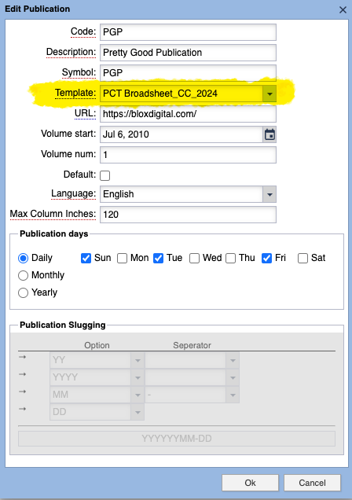
This highlighted menu shows how to set a default Adobe InDesign template for a publication. All templates produced with the BLOX Total CMS client for Adobe InDesign's Spawn Template tool will become options for this dialog.
Once set, it will become the default for all users of client version 5.67.00-03 and newer if they have not previously associated a publication with a template in either the BLOX Total CMS > Documents > New... or BLOX Total CMS > Documents > Advertising > Create Edition from Edition file... dialogs.
If you use a different template for certain sections or days of the week, we recommend adding additional publication codes. Multiple publication codes can be sent to the same BLOX Live e-Edition.
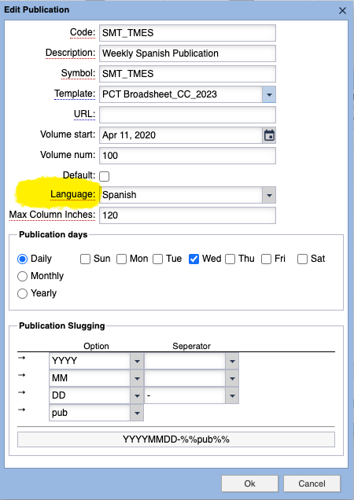
Use the highlighted area to select between English, French, and Spanish language for a publication. All date based folio text variables will automatically be rendered in the designated language.
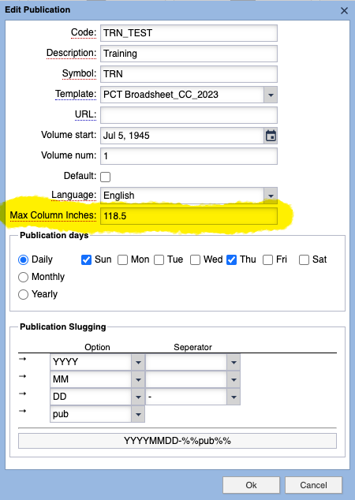
Use this field to list the maximum number of column inches available on an inside page of the publication. It will eventually be used for a variety of things:
- Helping the Automated Production function know how much total space is available on a page. This this alters the score of each available asset to that it can better chose which asset to place.
- Displaying the % of editorial content on pages.
- Determining content percentages in the Reporting functions.
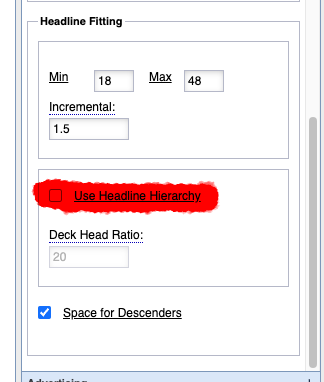
This image shows the current options for controlling the Head Fitting functionality. You can find this is Page Tracker's Application Settings and the Automated Production accordion.
This release of BLOX Total CMS Client 5.67 for Adobe InDesign includes a major new feature for Copy and Head Fitting. This release also includes improvements for Distributed Production and the return of the semi-automatic update for the BLOX Total CMS Client for InDesign.
NEW FEATURES
Major new feature: Page Tracker version 1.27 added settings for Copy Fitting and Head Fitting. With these settings, your site can control how the Copy Fit features function. Those features were added back in client version 5.60. Before Page Tracker version 1.27, all the settings were hard-coded and could have produced unpleasant results. Now, they can be fine-tuned. (INDESIGN-3715)
New head fitting feature: An earlier version of the client added the ability to invoke a headline feature where the BLOX Total CMS client for Adobe InDesign would enlarge/reduce the type size and text frame to fit the text in the headline frames. Page Tracker version 1.27 added a setting to allow the frame height to adjust to hold the descenders if they exist automatically. The two are now combined, and you can use BLOX Total CMS > Automated Production > Head Fit > Head Fit Selected Asset to auto-adjust the type size and leading according to the domain-based settings in Page Tracker's Application Settings. Additional changes to the operation are forthcoming as the subhead fitting options might not appeal to everybody. (INDESIGN-3717)
Important change for determining templates for creating new documents and editions: Page Tracker version 1.27 adds a default template choice for each publication code. Template Masters, or others with appropriate BLOX Permission Group membership, can now select from any Spawned Templates as the default Template for each publication code. To do that, use the browser interface and choose Desktop > Applications > Other > Settings > InDesign > Page creation settings. In that dialog, click on each publication code and choose Edit. In the dialog, use the Template: menu to select any of the uploaded templates. The list of uploaded templates comes from the BLOX Total CMS > Development > Spawn Template... function. Once set, any user who hasn't previously selected a template for a specific publication will now be directed to use the default rather than some internal default that was likely incorrect. (INDESIGN-4157)
This highlighted menu shows how to set a default Adobe InDesign template for a publication. All templates produced with the BLOX Total CMS client for Adobe InDesign's Spawn Template tool will become options for this dialog.
Once set, it will become the default for all users of client version 5.67.00-03 and newer if they have not previously associated a publication with a template in either the BLOX Total CMS > Documents > New... or BLOX Total CMS > Documents > Advertising > Create Edition from Edition file... dialogs.
If you use a different template for certain sections or days of the week, we recommend adding additional publication codes. Multiple publication codes can be sent to the same BLOX Live e-Edition.
IMPROVEMENTS
Internal change to logging during launch for macOS sites: A 2018 change to client version 5.29 allowed specific macOS-based sites to redirect the location of items. That, in turn, caused the startup logging to log an error falsely for those sites. Some changes were made to more accurately indicate the source of any issues with launching the client in macOS when the home folder enabler is included. The ultimate impact is that the log file will not falsely include an error listing. (INDESIGN-4134)
Change for handling Adobe InDesign recovery logs: Similar to the above release note, several years ago, a site needed to redirect its user's local resource folder to a different location. Combined with a potential change in Adobe InDesign Creative Cloud version 2024, that site would generate warnings about not being able to locate the Adobe InDesign Recovery log properly. That file is named ProtectiveShutdownLog. These are Adobe InDesign's logs, not BLOX Total CMS's. They list information that Adobe, not BLOX Digital, can use to help determine what issue is causing Adobe InDesign to shut down to protect the integrity of the Adobe InDesign document database (the .indd file). If a site is experiencing frequent Adobe InDesign crashes, the /InDesign Recovery/ProtectiveShutdownLog logs might provide an answer. In the past, the BLOX Total CMS client for Adobe InDesign would look for those log files and copy them to the Crash_Logs folder to a) keep them smaller and b) allow BLOX Digital to know that the site has external factors affecting a site's users. The warnings have been removed when the file cannot be located due to a site redirecting the user's folder. (INDESIGN-4195)
Copy Fit improvement: Long known by experienced page-building aficionados as one of the most important keys to quickly building pages, the use of a Baseline Grid has been extended to the Copy Fit function. A baseline grid allows the text to stay aligned across all columns. Combine that with a few other features, and squaring off the legs of text is painless. Alas, sometimes the grid is in the wrong place on the page for some articles. The solution Adobe brought to the table about a decade ago was Text frame-based grids. And now, if the Page Tracker Copy Fitting option is set to Override Baseline Grid, then the BLOX Total CMS > Automated Production > Copy Fit Selected Asset... feature will automatically add a baseline grid to the default frames of assets. Usually, this means that the main story element type frame or any threaded to it. The baseline grid will use the same increment as the one in the document but be set so that the first baseline aligns with the Cap Height. (INDESIGN-3709)
Head Fit improvement: The ability to Head Fit Selected Asset now can skip changing the print_subheadline frame. At some sites, the text of the print_subheadline remains fixed regardless of what happened to the size of the print_headline. Unfortunately, previously, the size of the print_subheadline always changed when using Head Fit Selected Asset. Now, if use Story Frame Options > No Head Fitting, or its Translation equivalent <&maintain:(,,,,,,1)>, the size of the text in the frame will be left alone. This can be used, for example, to prevent the functionality to work with certain snippets. In addition, in the initial versions of the function, from 2022, the size of the print_subheadline was always changed to 1/2 of the print_headline size. Now, the Page Tracker version 1.27 options control this. If the Use Headline Hierarchy option is unchecked, the size of the print_subheadline text will be modified to get the text to fit the frame without forcing the size to be the designated scale to the print_headline. (INDESIGN-4180)
This image shows the current options for controlling the Head Fitting functionality. You can find this is Page Tracker's Application Settings and the Automated Production accordion.
Client Update improvement: As originally configured, we assumed that the sites would have been following the update procedures, and that would have meant that there would be an existing NextVersion folder. However, we found that it is possible for a site to remove that folder after launch, which would cause the semi-automatic update process to fail. If the folder has been removed, it will be returned, and the update process can continue. (INDESIGN-4080)
New automatic purge of Distributed Production log files: Client 5.65 added a purge of the Remote Distributed Production users' Temporary directory. This version now adds a purge of the three BLOX Total CMS log folders on the Remote Distributed Production user's workstation. This function automatically purges up to 6% of the log files older than 30 days. Because of the number of files that might exist in these folders, the first several launches are expected to be slower than previous versions. This new purge functionality does not handle all the recommended remote workstation purging, just the log files. Each site's Information Technology staff should handle purging other BLOX Total CMS files post-publication. (INDESIGN-4183)
New support for Spanish and French language publications: Starting with an upcoming release of Page Tracker, individual publications can be marked as constructed in the English, Spanish, or French languages. When marked, all date-based folio text variables (F, H, and R, for example) will be created using the specified language and formatting. Previously the only option was to mark an entire domain as either English or Spanish. (INDESIGN-3473)
Use the highlighted area to select between English, French, and Spanish language for a publication. All date based folio text variables will automatically be rendered in the designated language.
This document outlines the Folio Text Variables that will exist even when the site and or user doesn't have access to the standard legacy add-ons.
Automated Production clear Copy Fit overrides: BLOX Total CMS client for Adobe InDesign version 5.60 added a Copy Fit function. The functionality requires a ruleset to know which styles can be modified. Once the ruleset exists, then Copy Fit will become available to users. The 5.67 version of the client adds the option to clear the changes from Copy Fit's use. It works by setting all the Adobe InDesign Text Style Ranges back to the original definition of the Paragraph Styles. Besides applying a Character Style, manual formatting will be removed when using this function. (INDESIGN-3707)
New Copy Fit translation command: BLOX Total CMS Template Masters can now call the Copy Fit functions as part of their rulesets. All it takes is a change to the existing <&fit:()> call in most site's Tail ruleset. For help configuring this, please file a support request at support.bloxdigital.com. (INDESIGN-3712)
Support for Column Inches per page: Page Tracker version 1.27 includes several additional options for describing a publication. One of those is the maximum column inches per page. The BLOX Total CMS client will now read that value and pass it along to the Automated Production functionality and reporting. (INDESIGN-3743)
Use this field to list the maximum number of column inches available on an inside page of the publication. It will eventually be used for a variety of things:
- Helping the Automated Production function know how much total space is available on a page. This this alters the score of each available asset to that it can better chose which asset to place.
- Displaying the % of editorial content on pages.
- Determining content percentages in the Reporting functions.
Force document ownership when placing content: There is now an option to cause the user who places the first BLOX asset on a page to become the Assigned User or Owner of the page. To use this option, please file a support ticket and request the option on the desired domains. We can remotely add a setting that will assign ownership of the page to the user who places the first asset on the page. Without the setting, there will not be a way to force this option until a future Page Tracker option is available. (INDESIGN-4161)
Modified logging for MacOS out of date parent story links: During the summer and fall of 2023 we've had occasional complaints from macOS sites of getting assets going out of date after editing within Adobe InDesign. We added an Optional function to remove checking those links, but we wanted some extra details in the log. When the links are found out of date, we now list the slug of the asset. If your site is experiencing this issue, please file a support ticket here. (INDESIGN-4164)
Slow Line Finder improvements: For many years, the BLOX Total CMS client for Adobe InDesign has had a built-in tool to help identify problems where the user's environment causes the client to run slowly or what feels slow to the user. This option is the Slow Line Finder in the Support tab of the Settings and Support... function. We've modified this to include additional data, including Errors and the Adobe PDF preset used to make Page Tracker previews. In addition, the function allows multiple logs to be processed and displays a progress bar as each log is processed. (INDESIGN-4166)
Minor change to update unplaced paths for Distributed Production users: For nearly a year, there has been a feature to allow the unplaced ad placeholder frames for sites that use our built-in advertising support to reset the path to the ads. The feature was intended to be a workaround for when sites build a publication with the wrong advertising paths. This could be because the paths changed or because they weren't available when the edition was created, and the person building the edition ignored the warnings and built it anyway. The feature was disabled/hidden for Distributed Production users. However, we discovered a special use case that caused us to re-enable the feature for all Adobe Creative Cloud users. The feature can be reached at BLOX Total CMS > Documents > Advertising > Update Unplaced Paths... (INDESIGN-4176)
Important change for Distributed Production sites concerning ads: When Distributed Production pages were closed without a user interface, we discovered all ads would be removed from the pages even if the page's workflow was set at the Penultimate workflow process or later. The ads (both placeholders and placed ads) will remain when the Distributed Production pages are closed without user interfaces. This will likely slow the closing process but could save time overall because of not needing to re-run Ad Statuses. (INDESIGN-4177)
New option to keep ads on Distributed Production pages at all workflow processes: The original release of Distributed Production limited pages from holding placed ads until they reached the penultimate workflow process of the Pages workflow. We had a site, however, that wanted the ads to remain the same because only a very limited number of users had access to the file server where the ads were kept. Thus, a true remote user couldn't output pages with ads because they couldn't access the original ads placed on the pages in-house. So, we've added a domain-based setting that BLOX Digital staff can enable that will cause checked-in pages to maintain both the placed ads and/or the empty ad placeholder frames pointing to the server path for the ads at every workflow process. Note: this will slow down the check-in and upload of pages but should result in less need for users to open pages to update ads and ultimately save time. If you would like this feature enabled, please file a request here. (INDESIGN-4177)
Distributed Production Remote users can now create new documents without using Enhanced Mode: Before this version of Distributed Production, remote users were prevented from creating new documents with existing documents open unless they were set to Enhanced Mode (an advertising feature). This is no longer a requirement. (INDESIGN-4163)
BUG FIXES
Removing document domain: There was an esoteric bug when using BLOX Total CMS > Set Document Domain... and choosing the Remove All Domains from this Document option. The bug presented itself with a request to convert the domain of the document and a request to log in again. The issue has been resolved. You can simulate the effects of Remove All Domains from this Document by selecting frames of the assets on the pages and using BLOX Total CMS > Release Selected Assets... (INDESIGN-4189)
Return of semi-automatic Client Upgrade: The semi-automatic client update function had a logic error that caused it to work a maximum of one time. This has been fixed. In addition, client version 5.62 added a second bug that prevented it from working at all. The function was completely removed in client 5.66. All known issues have now been fixed, and the functionality has been re-enabled. (INDESIGN-3963)