
In this major release of BLOX NXT (version 0.23.0), we are introducing BLOX Email Reach (BETA)—a new suite for newsletter creation, list management, campaign scheduling, and audience engagement—while also delivering significant improvements across Editorial, Community, Services, and Data. This update enhances real-time collaboration with live author presence, strengthens workflow clarity through upgraded status indicators, streamlines filtering and asset duplication workflows, adds powerful video trimming tools, and improves visibility for print workflows and metadata access. We’ve expanded beta tools such as Feeds and Delimited Service Management, added new dashboard filters and export capabilities, introduced a Video Plays Dashboard (BETA), refined UI elements across the platform, and resolved a wide range of bugs to ensure a faster, more reliable editorial and administrative experience.
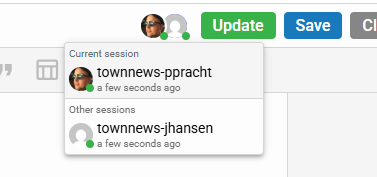
Editors can now see who is actively working on an article through a presence indicator system. Active collaborators are displayed with avatars next to the asset title, with bold/full-color indicators for active users and muted display for those inactive for 5+ minutes. Hovering over avatars reveals the user's name or email address. (CMSADMIN-1181)
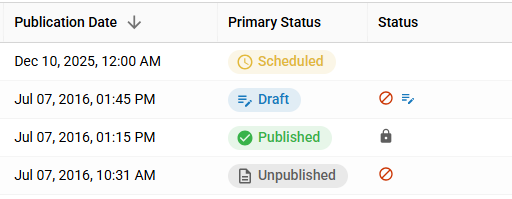
The Status column now displays dual indicators: a primary status tag (Published, Draft, Scheduled, Processing, Unpublished) and contextual icons for edit locks, publishing disabled, placed on page, workflow blocks, and unpublished changes. (CMSADMIN-215)
You can now forcibly unlock assets in NXT that are locked by the legacy (Blue) admin. This allows editors and admins to continue working without waiting for a lock to expire or contacting the locking user. The feature is available in both the asset view and the right-click menu in Search, with a confirmation prompt to prevent accidental unlocks. (CMSADMIN-1593)
Partners with BLOX VMS can now trim existing videos in NXT directly within a pop-up modal and instantly create a new asset. This includes draggable mark-in/mark-out controls, trim preview, and automated asset creation with appended titles. Once a clip is generated in a new tab, you will be able to modify the video’s fielded data thereafter. (CMSADMIN-1588)
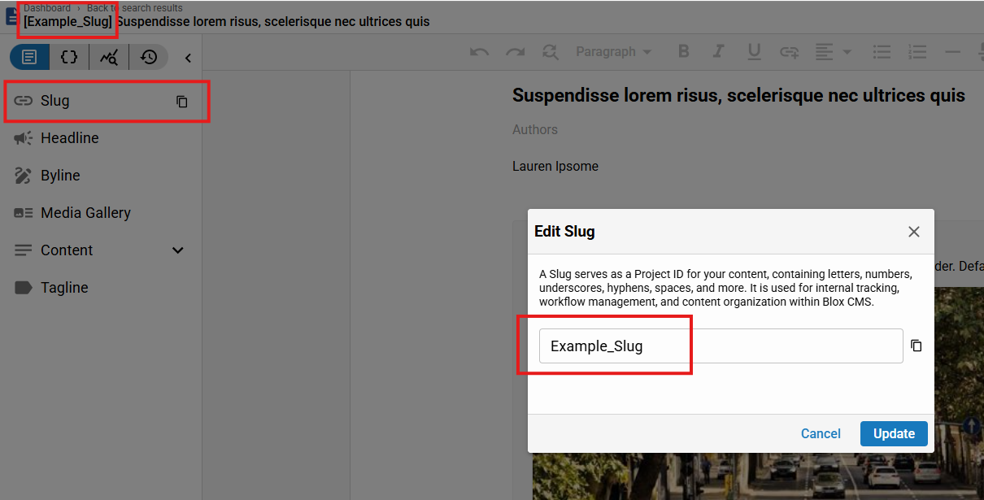
The Slug field is now more accessible for print-centric newsrooms. It appears in the Content Outline panel with quick copy functionality, and when present, displays in brackets before the headline in the Asset headline/breadcrumbs navigation. (CMSADMIN-1760)
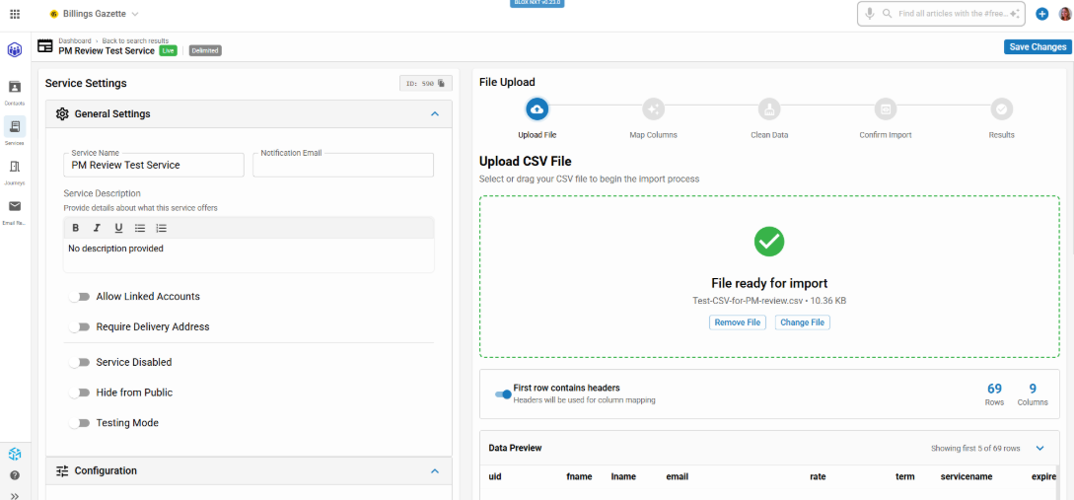
Within the beta Services application, administrators can now create, view, and edit Delimited type services through a new full-screen management experience. This enhanced interface provides a structured, multistep workflow designed to make CSV-based service setup faster, clearer, and more efficient. (CMSADMIN-834)
BLOX NXT 0.23.0 Gallery
Editors can now see who is actively working on an article through a presence indicator system. Active collaborators are displayed with avatars next to the asset title, with bold/full-color indicators for active users and muted display for those inactive for 5+ minutes. Hovering over avatars reveals the user's name or email address. (CMSADMIN-1181)
The Status column now displays dual indicators: a primary status tag (Published, Draft, Scheduled, Processing, Unpublished) and contextual icons for edit locks, publishing disabled, placed on page, workflow blocks, and unpublished changes. (CMSADMIN-215)
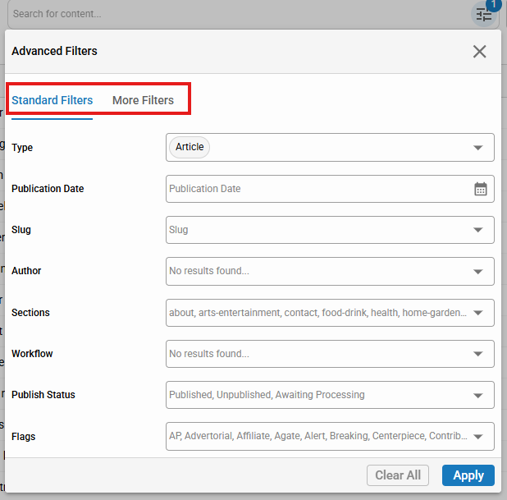
The Filters modal has been restructured into a two-tab layout with "Standard Filters" and "More Filters" tabs, improving usability and visual hierarchy for easier scanning and reduced cognitive load. (CMSADMIN-1561)
You can now forcibly unlock assets in NXT that are locked by the legacy (Blue) admin. This allows editors and admins to continue working without waiting for a lock to expire or contacting the locking user. The feature is available in both the asset view and the right-click menu in Search, with a confirmation prompt to prevent accidental unlocks. (CMSADMIN-1593)
Partners with BLOX VMS can now trim existing videos in NXT directly within a pop-up modal and instantly create a new asset. This includes draggable mark-in/mark-out controls, trim preview, and automated asset creation with appended titles. Once a clip is generated in a new tab, you will be able to modify the video’s fielded data thereafter. (CMSADMIN-1588)
The Slug field is now more accessible for print-centric newsrooms. It appears in the Content Outline panel with quick copy functionality, and when present, displays in brackets before the headline in the Asset headline/breadcrumbs navigation. (CMSADMIN-1760)
Within the beta Services application, administrators can now create, view, and edit Delimited type services through a new full-screen management experience. This enhanced interface provides a structured, multistep workflow designed to make CSV-based service setup faster, clearer, and more efficient. (CMSADMIN-834)
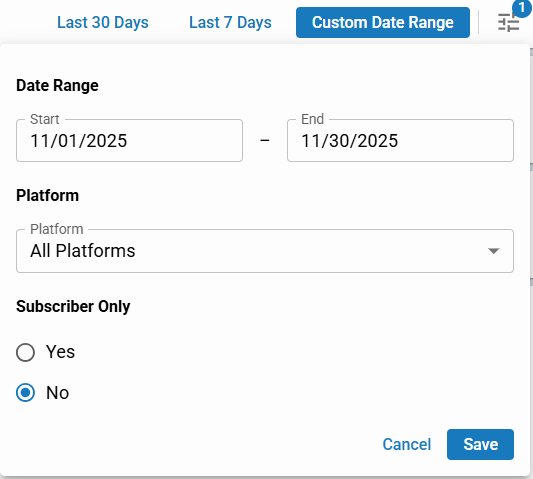
Dashboard widgets now support filtering by date range, platform (Web, Native App, CTV App), and subscriber status. Date range defaults to Last 30 days with options for Last 7 days and custom ranges. (CMSADMIN-661)
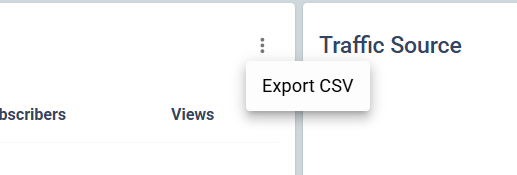
You can now easily export widget data directly from dashboards using the new export option, available via the three-dot menu in the upper-right corner of each widget. (CMSADMIN-755)
Editorial Features and Improvements
Real-Time Author Presence in Articles
Editors can now see who is actively working on an article through a presence indicator system. Active collaborators are displayed with avatars next to the asset title, with bold/full-color indicators for active users and muted display for those inactive for 5+ minutes. Hovering over avatars reveals the user's name or email address. (CMSADMIN-1181) 📷
Improve Status Column Display
The Status column now displays dual indicators: a primary status tag (Published, Draft, Scheduled, Processing, Unpublished) and contextual icons for edit locks, publishing disabled, placed on page, workflow blocks, and unpublished changes. (CMSADMIN-215) 📷
Advanced Filters Component Redesigned
The Filters modal has been restructured into a two-tab layout with "Standard Filters" and "More Filters" tabs, improving usability and visual hierarchy for easier scanning and reduced cognitive load. (CMSADMIN-1561) 📷
Duplicating an Asset Defaults to Draft & Unpublished
When duplicating an asset, the new version automatically defaults to Draft status and remains Unpublished, preventing accidental publication of unreviewed content. (CMSADMIN-1578)
Video Asset Trim and Copy Feature
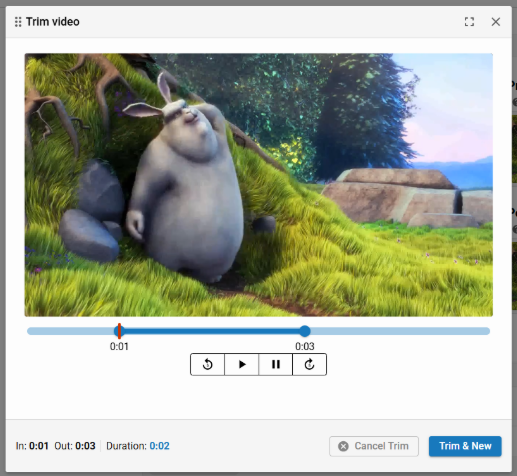
Partners with BLOX VMS can now trim existing videos in NXT directly within a pop-up modal and instantly create a new asset. This includes draggable mark-in/mark-out controls, trim preview, and automated asset creation with appended titles. Once a clip is generated in a new tab, you will be able to modify the video’s fielded data thereafter. (CMSADMIN-1588) 📷
Force Unlock for Legacy-Locked Assets
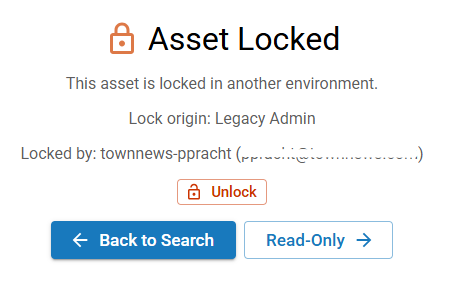
You can now forcibly unlock assets in NXT that are locked by the legacy (Blue) admin. This allows editors and admins to continue working without waiting for a lock to expire or contacting the locking user. The feature is available in both the asset view and the right-click menu in Search, with a confirmation prompt to prevent accidental unlocks. (CMSADMIN-1593) 📷
Slug Field Enhanced for Print Workflows
The Slug field is now more accessible for print-centric newsrooms. It appears in the Content Outline panel with quick copy functionality, and when present, displays in brackets before the headline in the Asset headline/breadcrumbs navigation. (CMSADMIN-1760) 📷
UUID Now Accessible in Metadata Properties
The Metadata Properties section now includes a UUID field with a convenient copy-to-clipboard shortcut, addressing the needs of sites that relied on static UUID access in the legacy platform. (CMSADMIN-2003)
Update AI Headline Generation Prompt to Enforce Standardized Style
The headline generation tool now enforces consistent style formatting with updated prompt rules for length (50–60 characters), case (sentence case), tense, voice, and professional tone. (CMSADMIN-2024)Feeds: Quick Filters Support (BETA)
Within the beta Feeds application, users can now save and quickly reapply common search filters—functionality equivalent to Saved Searches in the legacy system. (CMSADMIN-1329)
Community Features and Improvements
Default Community Link Now Points to Contacts Account Search
The Community link in the bento menu now points to the Contacts account search instead of the dashboard, improving accessibility for users without dashboard permissions. (CMSADMIN-1898)Services: AI-Powered Smart Subscriber Upload with Delimited Service Management – Full-Screen Detail View (BETA)
Within the beta Services application, administrators can now create, view, and edit Delimited type services through a new full-screen management experience. This enhanced interface uses AI to map columns, and provides a structured, multistep workflow designed to make CSV-based service setup faster, clearer, and more efficient. (CMSADMIN-834) 📷Add Forced Recurring On/Off Toggle for Subscriptions (Services BETA)
Within the beta Services application, subscription management now includes an on/off toggle for auto-renewal when non-forced recurring payments are allowed. This gives admins control over the recurring status for individual subscriptions. (CMSADMIN-1406)
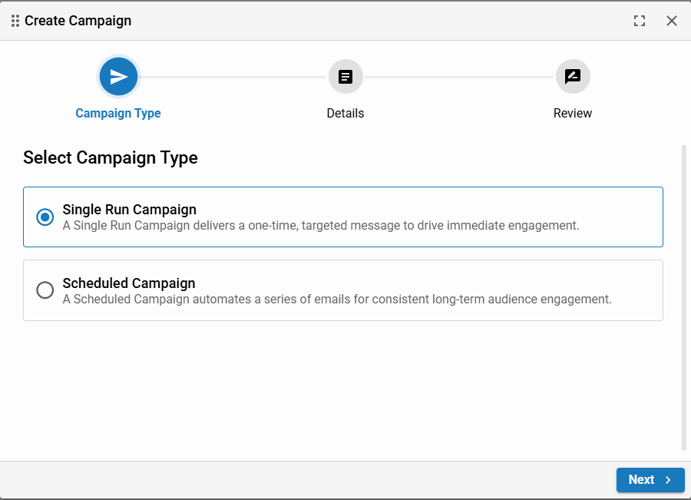
Within the beta Email Reach application, you can now schedule email newsletters in advance, with support for both single-run and recurring campaigns. Configure audience targeting, custom subjects, scheduling frequency (weekly or monthly), and recurrence with automatic clarification messages. (CMSADMIN-1216)
BLOX Email Reach - 0.23 Gallery
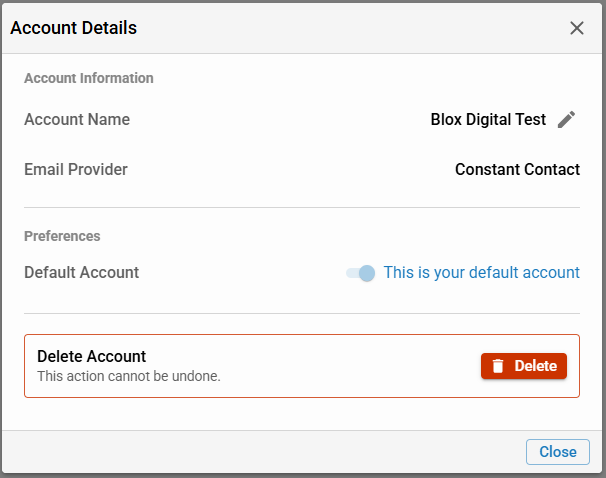
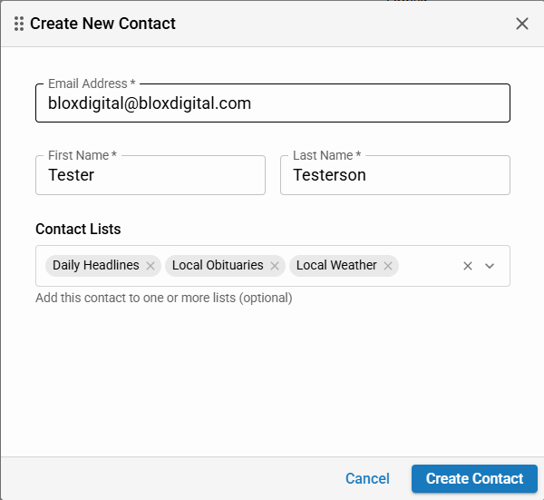
Within the beta Email Reach application, you can now manage contacts that belong to your lists, and are in your Email Reach database. You can add individual users, add metadata, and manage list preferences for all of your contacts. (CMSADMIN-1217)
Within the beta Email Reach application, you can now schedule email newsletters in advance, with support for both single-run and recurring campaigns. Configure audience targeting, custom subjects, scheduling frequency (weekly or monthly), and recurrence with automatic clarification messages. (CMSADMIN-1216)
Email Reach (Beta)
Email Reach: Sent Messages (BETA)
Within the beta Email Reach application, you can now view comprehensive details for sent email campaigns, including delivery status, open rates, click rates, forwards, bounces, spam reports, and message link performance. This feature is in Beta, and requires partners to request that their Email Reach setup be migrated to NXT before use. (CMSADMIN-1218)Email Reach: List Management (BETA)
Within the beta Email Reach application, you can now create and edit newsletter lists and their associated metadata. Manage list name, from name, priority, icons, frequency, and visibility settings using the same streamlined UI/UX pattern as the Email Reach admin. This feature is in Beta, and requires partners to request that their Email Reach setup be migrated to NXT before use. (CMSADMIN-1215) 📷
Email Reach: Campaign Management (BETA)
Within the beta Email Reach application, you can now schedule email newsletters in advance, with support for both single-run and recurring campaigns. Configure audience targeting, custom subjects, scheduling frequency (weekly or monthly), and recurrence with automatic clarification messages. This feature is in Beta, and requires partners to request that their Email Reach setup be migrated to NXT before use. (CMSADMIN-1216) 📷
Email Reach: Manage List Contacts (BETA)
Within the beta Email Reach application, you can now manage contacts that belong to your lists, and are in your Email Reach database. You can add individual users, add metadata, and manage list preferences for all of your contacts. This feature is in Beta, and requires partners to request that their Email Reach setup be migrated to NXT before use. (CMSADMIN-1217) 📷
Data Features and Improvements
Beta Menu Item Updates
Beta menu items are now visually accessible, but inactive for users not enrolled in beta testing. This approach keeps users informed about upcoming features while preventing access to tools still in development. A helpful tooltip clarifies that these features are in beta, ensuring transparency without cluttering the interface. If you encounter these menu items and are curious about joining the beta, please contact your BLOX Digital customer support for more information. (CMSADMIN-1652)Dashboard Filters
Dashboard widgets now support filtering by date range, platform (Web, Native App, CTV App), and subscriber status. Date range defaults to Last 30 days with options for Last 7 days and custom ranges. (CMSADMIN-661) 📷Export Function
You can now easily export widget data directly from dashboards using the new export option, available via the three-dot menu in the upper-right corner of each widget. (CMSADMIN-755) 📷Video Plays (BETA)
A new Video Plays Dashboard is now available in the Content Management application, providing video editors with comprehensive insights into video consumption metrics and performance analytics. (CMSADMIN-1920)Remove Beakers from Dashboards
Beta indicator beaker icons have been removed from the Contacts Management Dashboard, Content Management Dashboard, and Editorial Asset Level Dashboard. (CMSADMIN-1896)Table Enhancements for Module-Based Formatting
Table widgets now correctly format columns according to module configuration (e.g., percentage formatting for completion rates). (CMSADMIN-2020)Sort on Table Widgets
Table widgets in dashboards now support single-click column sorting. (CMSADMIN-1055)
Bugs
The Save and Promote/Demote actions in article editing now correctly respect workflow group restrictions. Previously, users with edit permissions could bypass workflow group assignments. The system now ensures that users must have both the appropriate permissions AND be in the correct workflow group to perform these actions. Additionally, changing the workflow process must now be done through the Save dropdown menu rather than directly from the Metadata section. (CMSADMIN-2136)
Fixed an issue where quick filters in the Assets application did not retain their sort order. Quick filters now correctly honor the sorting parameters set at the time of saving, ensuring results load in the intended order (e.g., newest to oldest). (CMSADMIN-1662)
Fixed an issue where only admin accounts appeared in the Author selection dropdown. All user accounts, including basic users and stringers, are now accessible when selecting authors on editorial assets. (CMSADMIN-1708)
Fixed an issue where metadata placeholders (SEO Title, Social Title, Canonical URL, Summary, etc.) did not update after duplicating an asset. These fields now refresh dynamically to reflect the latest headline or body copy. (CMSADMIN-1778)
We fixed an issue where the inline email indicators for collaborative users would sometimes get cutoff. (CMSADMIN-1938)
Fixed an issue where a user was randomly unable to add keywords to an article asset. (CMSADMIN-2017)
Fixed an issue where the Workflow field in batch edit incorrectly displayed raw IDs and “keep” values. The field now correctly shows only valid workflow options, with the “Remove” option at the top. Workflows can continue to be added or removed as intended during batch edits. (CMSADMIN-2022)
Fixed an issue where pressing Ctrl+F to open the Find/Replace tool in the story editor would insert text into the body copy instead of focusing on the Find input field. (CMSADMIN-2055)
Added support for TIFF file previews in NXT Admin. (CMSADMIN-2065)
If you experience any issues or have any questions, please contact customer support at (800) 293-9576 or BLOXDigital.com/support.


