
In this release of BLOX NXT (version 0.25.0), we’re delivering a major set of new features and improvements across editorial workflows, subscription management, dashboards, and Email Reach. Highlights include a new Transactions app (beta) for centralized payment tracking, improved workflow management controls, multi-domain dashboard filtering, enhanced batch upload presets, and a new relationships filter in the editor. This release also addresses numerous bugs spanning inline asset handling, publishing controls, dark mode visibility, and more.
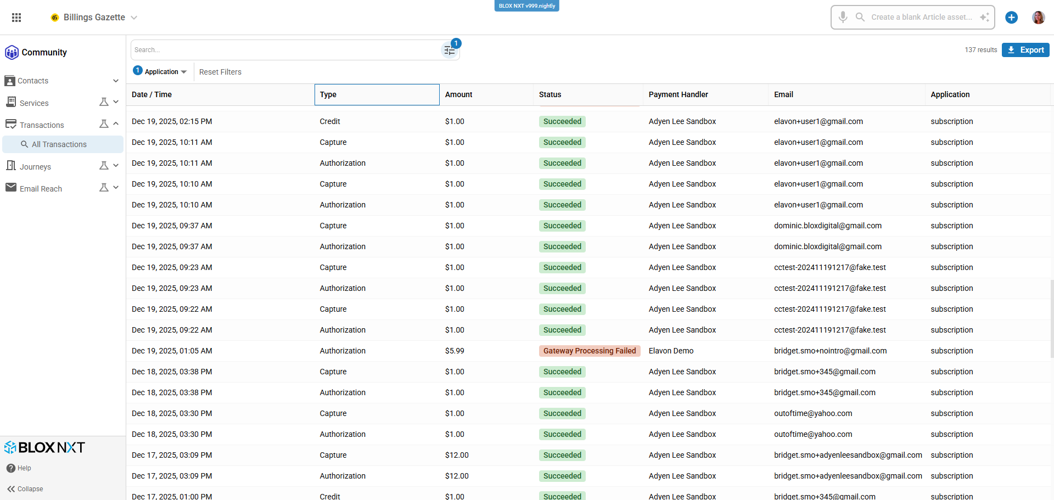
Introducing the new Transactions app in BLOX NXT (Beta), a centralized financial management tool that allows administrators to search, filter, and export transaction data across Subscriptions, Forms, and AdOwl in a single unified interface, streamlining customer service and reconciliation workflows.
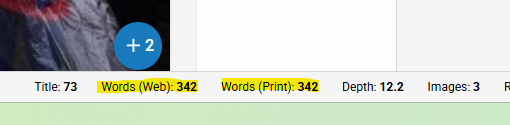
For sites using BLOX TotalCMS, the Story Info Bar now displays separate word counts for Web and Print versions of an article, and the Depth value dynamically updates based on trimmed print content. The print trim button is now hidden on sites that do not have TotalCMS print installed.
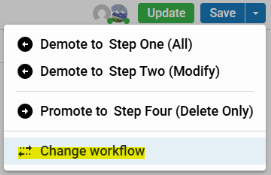
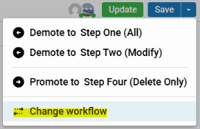
Workflow controls have been redesigned for clarity and consistency. A new “Change Workflow” option is available from the Save button dropdown, opening a dedicated modal where you can select a workflow and process before saving. The Metadata tab now displays a “Change workflow or process” button that then indicates the area in the asset where wofklow changes ought to occur.
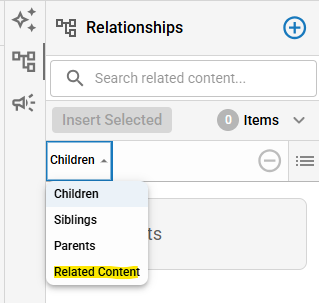
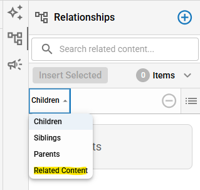
Non-inline related content styles (Bio Box, Pull Quotes, Corrections etc.) are now accessible in the Relationships drawer under a new Relationships dropdown. These items can be edited in a modal and are also rendered in the Additional Content placeholder. Related content items sync through collaboration sessions.
BLOX NXT 0.25.0 Gallery
Introducing the new Transactions app in BLOX NXT (Beta), a centralized financial management tool that allows administrators to search, filter, and export transaction data across Subscriptions, Forms, and AdOwl in a single unified interface, streamlining customer service and reconciliation workflows.
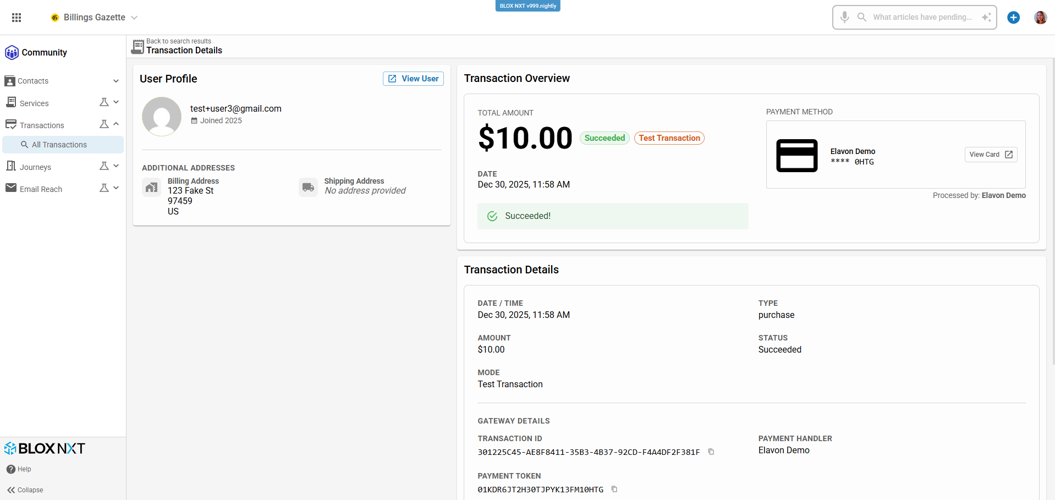
Drill into detailed transaction views showing payment status, method, and outcomes, link directly to the user’s Single Customer View for full context, and export results to CSV for reconciliation and reporting.
For sites using BLOX TotalCMS, the Story Info Bar now displays separate word counts for Web and Print versions of an article, and the Depth value dynamically updates based on trimmed print content. The print trim button is now hidden on sites that do not have TotalCMS print installed.
Workflow controls have been redesigned for clarity and consistency. A new “Change Workflow” option is available from the Save button dropdown, opening a dedicated modal where you can select a workflow and process before saving. The Metadata tab now displays a “Change workflow or process” button that then indicates the area in the asset where wofklow changes ought to occur.
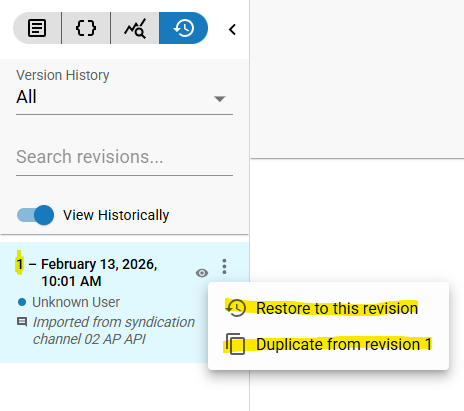
The Revision History panel now displays the revision number alongside each entry’s date, time, and user, making it easier to reference and communicate about specific revisions
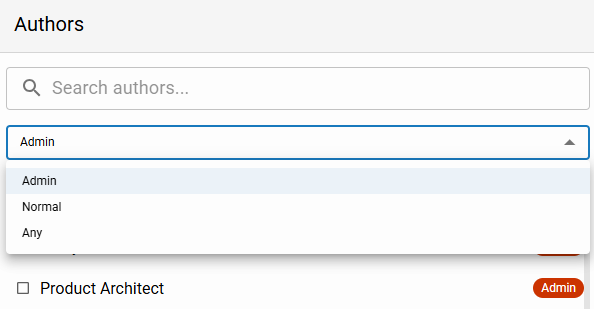
The Author selection tool now supports filtering by account type — Admins (default), Normal, or Any — and displays account type chips along with first name, last name, and screen name for each user.
The Author selection tool now supports filtering by account type — Admins (default), Normal, or Any — and displays account type chips along with first name, last name, and screen name for each user.
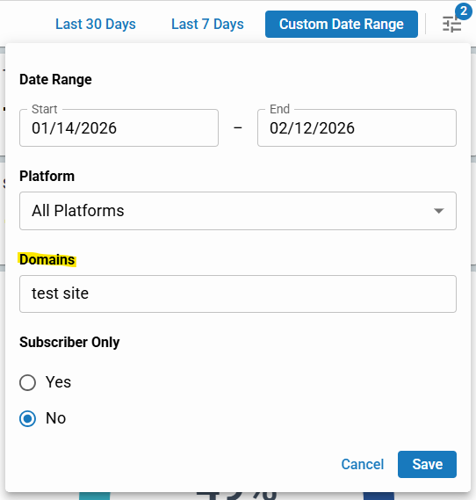
Dashboards now support filtering by domain, allowing you to view analytics across multiple domains you have access to. The default is your current domain, with the ability to expand to additional sites. (CMSADMIN-2045)
Non-inline related content styles (Bio Box, Pull Quotes, Corrections etc.) are now accessible in the Relationships drawer under a new Relationships dropdown. These items can be edited in a modal and are also rendered in the Additional Content placeholder. Related content items sync through collaboration sessions.
Features & Improvements
NXT Transactions (BETA)
Introducing the new Transactions app in BLOX NXT (Beta), a centralized financial management tool that allows administrators to search, filter, and export transaction data across Subscriptions, Forms, and AdOwl in a single unified interface, streamlining customer service and reconciliation workflows.
Key features include:
Search transactions by date range, transaction type, customer details, and more
View a consolidated transaction table across multiple revenue streams
Drill into detailed transaction views with payment status, method, and outcomes
Link directly to the user’s Single Customer View for full context
Export transaction results to CSV for reconciliation and reporting
This release brings a critical legacy capability into NXT with an improved layout and foundational search tools, with additional filters and enhancements planned in future updates. (CMSADMIN-1574) 📷
Depth & Print-Ready Columns in Editorial Search
Sites using BLOX TotalCMS can now toggle on optional Depth and Print Ready columns in editorial search results. The Print column displays “Ready for print” or “Not print ready” for each asset. (CMSADMIN-1617)
Web & Print Word Counts and Dynamic Depth
For sites using BLOX TotalCMS, the Story Info Bar now displays separate word counts for Web and Print versions of an article, and the Depth value dynamically updates based on trimmed print content. The print trim button is now hidden on sites that do not have TotalCMS print installed. (CMSADMIN-2013) 📷
Improved Workflow Management
Workflow controls have been redesigned for clarity and consistency. A new “Change Workflow” option is available from the Save button dropdown, opening a dedicated modal where you can select a workflow and process before saving. The Metadata tab now displays a “Change workflow or process” button that then indicates the area in the asset where workflow changes ought to occur. (CMSADMIN-1848) 📷
Batch Upload Presets & Status Column
The Batch Upload tool now includes a collapsible Presets panel where you can configure workflow, publish status, keywords, slug, author tags, and section tags before uploading. A new Status column in the results table shows the editorial state applied to each uploaded asset. (CMSADMIN-1331) 📷
Open Inline Assets in a New Tab
You can now open inline assets (such as videos or images) directly in a new browser tab from the inline placeholder or the Edit interface, making it easier to manage multimedia assets without leaving your current article. (CMSADMIN-1642)
Revision Numbers in Revision History
The Revision History panel now displays the revision number alongside each entry’s date, time, and user, making it easier to reference and communicate about specific revisions. (CMSADMIN-1824) 📷
Duplicate Asset from a Specific Revision
You can now duplicate an asset from a specific revision via a new “Duplicate from Revision” action in the Revision History panel. The revert-to-revision system message has also been improved with a human-readable timestamp and revision number. (CMSADMIN-1777) 📷
Filter Existing Relationships
The Relationships drawer now includes a filter bar, allowing you to search existing related assets by title, asset ID, or relationship type without scrolling through long lists. (CMSADMIN-1984)
Hi-Res Image Downloads
Downloading an image from the editor now provides the highest-resolution version of the file, rather than the browser’s display resolution. (CMSADMIN-2009)
Improved Author Selection Tool
The Author selection tool now supports filtering by account type — Admins (default), Normal, or Any — and displays account type chips along with first name, last name, and screen name for each user. (CMSADMIN-2010) 📷
Multi-Domain Dashboard Filtering
Dashboards now support filtering by domain, allowing you to view analytics across multiple domains you have access to. The default is your current domain, with the ability to expand to additional sites. (CMSADMIN-2045) 📷
Dashboard Table Paging
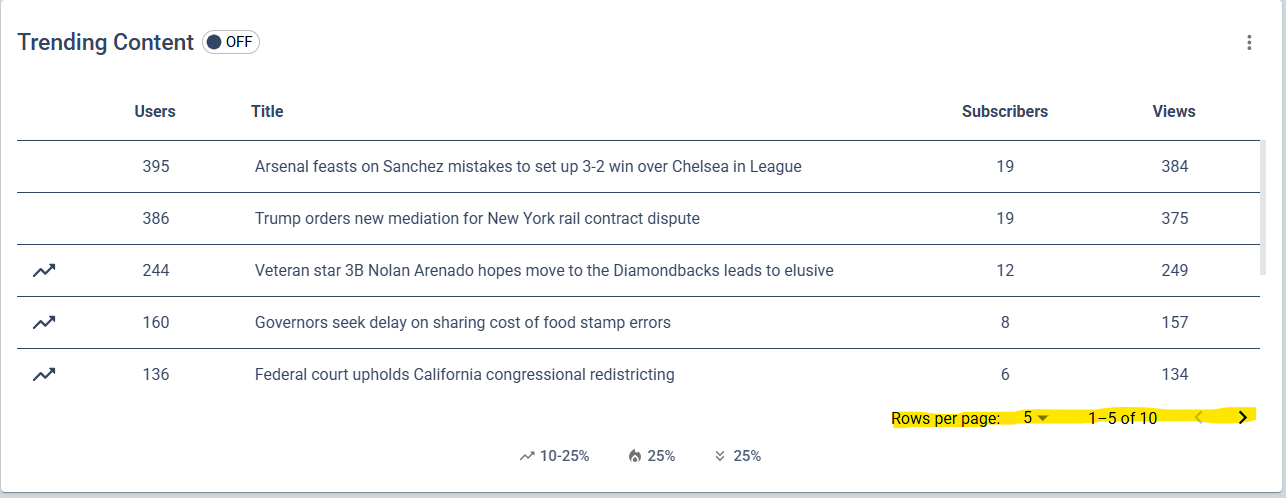
Users are now able to page on table widgets allowing users to see more of the dataset within the dashboard experience. This applies to all table widgets. (CMSADMIN-754) 📷
Related Content in Relationships Drawer
Non-inline related content styles (Bio Box, Pull Quotes, Corrections etc.) are now accessible in the Relationships drawer under a new Relationships dropdown. These items can be edited in a modal and are also rendered in the Additional Content placeholder. Related content items sync through collaboration sessions. (CMSADMIN-1366) 📷
“Open in New Tab” Default for Links
The “Open in new tab or window” checkbox for Link assets now defaults to checked, matching legacy behavior. (CMSADMIN-1623)
Collaboration: Cover Art & Teaser Image Sync
Cover art images and teaser (preview) images now display correctly for all users in a collaboration session. Adding or removing a cover art image or uploading a teaser image is reflected visually in real time across all collaborators. (CMSADMIN-1821, CMSADMIN-1822)
Notifier Post Time Default
When creating a Notifier post from the in-article tool, the scheduled time now defaults to the current time instead of one hour in the future. (CMSADMIN-2011)
BETA
Email Reach: Export Contacts (Beta)
The Email Reach contact management panel now includes an Export button that downloads your search results to a CSV file, including email addresses, first name, last name, and list subscriptions. Email Reach is currently in beta and functionality may change prior to general availability. (CMSADMIN-1729)
Email Reach: Unsubscribe Management (Beta)
A new Unsubscribe toggle is available in the Email Reach contact management panel, allowing newsletter managers to manage a user’s unsubscribe status directly within BLOX NXT. Email Reach is currently in beta and functionality may change prior to general availability. (CMSADMIN-2061)
Pre-Launch Modal for Asset Duplication (Beta)
When duplicating an asset, the same pre-launch modal used during asset creation now appears, letting you set the workflow, start time, and slug before the duplicate opens in the editor. (CMSADMIN-2080)
AdOwl Feeds/Syndication Improvements (Beta)
Several improvements have been made to AdOwl channel in Feeds (Syndication) in NXT, including fixes to category search, date filters, and category display in search results. (CMSADMIN-1200)
Bugs
Fixed an issue where the omni search bar appeared empty after searching with a “Reset password for” query, even though search results were correct. (CMSADMIN-1371)
Fixed an issue where typing the year in the publication date field within the Publish modal cleared all other date values. (CMSADMIN-1521)
Fixed an issue where spaces could not be entered in the Revisions search bar. (CMSADMIN-1533)
Fixed an issue where the success message in the Create User modal was not visible in dark mode. (CMSADMIN-1629)
Fixed an issue where several dashboard widgets did not display correctly in smaller viewports. (CMSADMIN-1641)
We fixed an issue in NXT Contacts where the transaction ID shown in the subscription detail view did not match the ID displayed in legacy BLOX Subscription; transaction IDs are now consistent across both systems. (CMSADMIN-2085)
Fixed an issue where the “Next Rate” field in the subscription details modal did not update after a rate change unless the page was refreshed. The field now updates immediately as expected. (CMSADMIN-1724)
Fixed an issue where inline content display properties could not be updated until after the article was saved for the first time. (CMSADMIN-1829)
Fixed an issue where updates to inline assets were not reflected in the article body copy when collaboration was enabled. (CMSADMIN-1864)
Fixed an issue where editing content with embedded Twitter references in NXT Admin could break the embedded reference. (CMSADMIN-1884)
Fixed an issue where dragging a media file over the video description field caused a TypeError. (CMSADMIN-1957)
Fixed an issue where unsupported BMP files could be uploaded to collection assets without validation. (CMSADMIN-2025)
Fixed an issue where the batch edit form did not properly display keep/add/remove options for sections and flags. (CMSADMIN-2048)
Fixed an issue where super users assigned as authors displayed as UUIDs instead of their names or email addresses. (CMSADMIN-2049)
Fixed an issue where fullscreen modal buttons were not accessible on iOS Safari due to the browser bar overlapping the bottom of the screen. (CMSADMIN-2134)
Fixed an issue where the Update button in the Publish modal was not disabled after saving, allowing duplicate submissions. (CMSADMIN-2139)
Fixed an issue where special characters like “&” in text area fields were being encoded as “&” and stored that way, causing display issues on the frontend. (CMSADMIN-2142)
Fixed an issue where metadata field tooltips were not properly positioned on half-width fields, and date field tooltips displayed incorrect information. (CMSADMIN-2148)
In this release we are making infrastructure changes that should not be noticeable to admin or front-end users. If you experience any issues or have any questions, please contact customer support at (800) 293-9576 or BLOXDigital.com/support.


