
In this release of BLOX NXT (version 0.26.0), we are delivering new tools for editorial teams including Story Templates, a right-click context menu in the Relationships drawer, media gallery status visibility, author sorting, and improvements to saved searches. Administrators with Audience+ access will also find a new Community Reports dashboard for subscription insights. A number of additional features are available to customers participating in the BLOX NXT Beta Program, including Notifier, file upload support for BLOX Digital Assistant, Design Block cloning, Custom Dashboard Search, and Email Reach improvements.
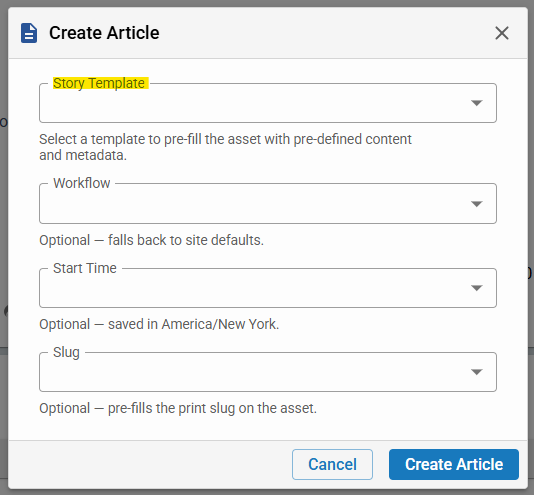
Editors can save any article as a story template and access the full template library via Templates search under the Assets menu. Customers in the BLOX NXT Beta Program can also select a template directly from the Create Asset modal at article creation time — a convenience that will be available to all sites in a future release. (CMSADMIN-641, CMSADMIN-1065, CMSADMIN-1703)
0.26.0
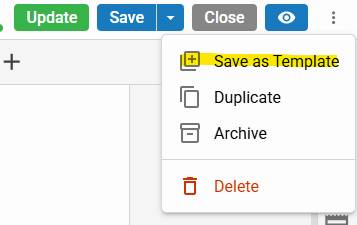
Editors can save any article as a story template and access the full template library via Templates search under the Assets menu. (CMSADMIN-641, CMSADMIN-1065, CMSADMIN-1703)
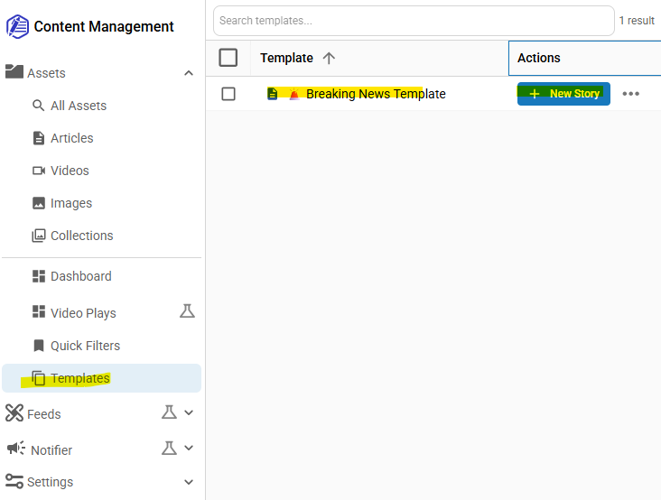
Editors can save any article as a story template and access the full template library via Templates search under the Assets menu. (CMSADMIN-641, CMSADMIN-1065, CMSADMIN-1703)
Editors can save any article as a story template and access the full template library via Templates search under the Assets menu. Customers in the BLOX NXT Beta Program can also select a template directly from the Create Asset modal at article creation time — a convenience that will be available to all sites in a future release. (CMSADMIN-641, CMSADMIN-1065, CMSADMIN-1703)
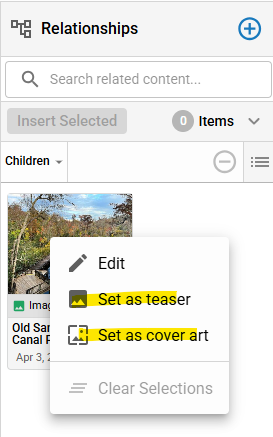
Editors can now right-click assets in the Relationships drawer to quickly set them as the teaser or cover image, reducing the steps needed to update asset presentation. (CMSADMIN-1987)
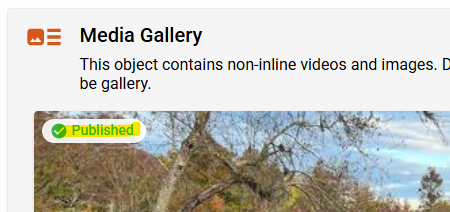
The media gallery thumbnail view now displays asset status chips (Draft, Published, Unpublished) directly on each preview image, giving editors at-a-glance visibility into content status. (CMSADMIN-1808)
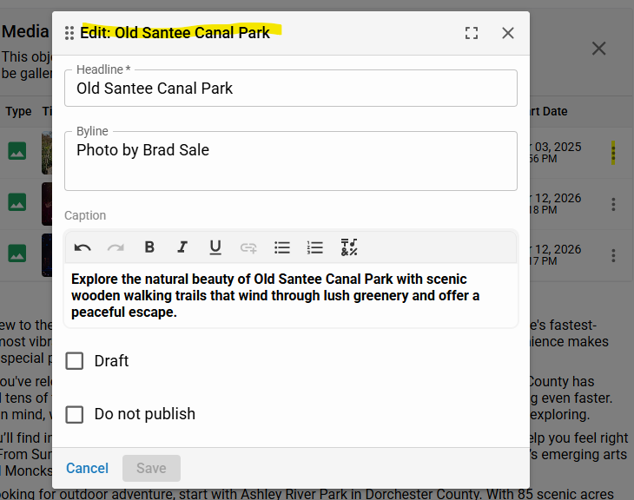
Quick edit controls are now always available in the media gallery, even when only a single media item is present, ensuring editors can always adjust asset settings. (CMSADMIN-1809)
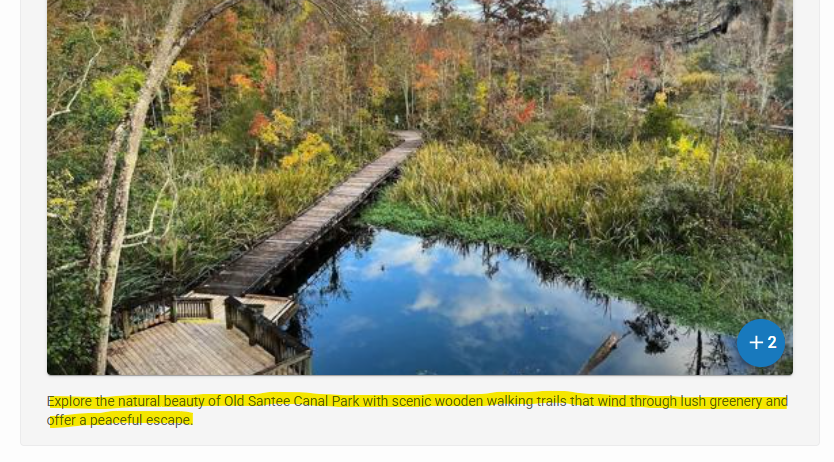
The caption for the first non-inline media gallery item is now displayed correctly in the article editor, consistent with how captions appear for inline assets. (CMSADMIN-1659)
Features & Improvements
Story Templates
Every newsroom has story types it publishes again and again — the game recap, the city council brief, the obituary. Story Templates let editors codify the structure, formatting, and field setup for those recurring formats so every new article can start from a known, consistent foundation rather than a blank page. Editors can save any article as a story template and access the full template library via Templates search under the Assets menu. Customers in the BLOX NXT Beta program can also select a template directly from the Create Asset modal at article creation time — a convenience that will be available to all sites in a future release. (CMSADMIN-641, CMSADMIN-1065, CMSADMIN-1703) 📷
Right-Click Context Menu in Relationships Drawer
Editors can now right-click assets in the Relationships drawer to quickly set them as the teaser or cover image, reducing the steps needed to update asset presentation. (CMSADMIN-1987) 📷
Display Asset Status Chips in Media Gallery Preview
The media gallery thumbnail view now displays asset status chips (Draft, Published, Unpublished) directly on each preview image, giving editors at-a-glance visibility into content status. (CMSADMIN-1808) 📷
Enable Edit Access for Single-Item Media Gallery
Edit controls are now always available in the media gallery, even when only a single media item is present, ensuring editors can always adjust asset settings. (CMSADMIN-1809) 📷
Show Caption for First Media Gallery Item
The caption for the first non-inline media gallery item is now displayed correctly in the article editor, consistent with how captions appear for inline assets. (CMSADMIN-1659) 📷
Allow Sorting Authors
The authors field now supports drag-to-reorder functionality, allowing editors to set the order of authors on an article without needing to remove and re-add them. (CMSADMIN-1677)
Add Edit/Delete Options for Saved Searches/Quick Filters
Users can now edit and delete existing quick filters / saved searches through a new management menu, providing full control over their saved search library. (CMSADMIN-1360)
Dashboards: Contacts Ticker for Sites Without Subscription Entitlements
Subscription metrics are now removed from the Contacts KPI metric bar for sites that do not have subscription entitlements, such as broadcasters, surfacing more relevant data for those customers. (CMSADMIN-1281)
BETA
All features and improvements below require participation in the beta program for BLOX NXT.
Notifier: Search, Create, and Edit in NXT
The Notifier application now supports searching, creating, and managing notifications within BLOX NXT, streamlining alert creation and tracking for newsroom editors. (CMSADMIN-1140)
Notifier: Channels Configuration
Site administrators can now configure and manage notification channels within Notifier, including defining delivery destinations and setting up automatic notification rules. (CMSADMIN-1143)
BLOX Digital Chat Assistant: File Upload & Parsing
The BLOX Digital Chat Assistant now supports uploading and parsing documents such as press releases and police reports, allowing reporters and editors to generate content directly from uploaded files. (CMSADMIN-1943)
Design Blocks: Clone Blocks to Multiple Sites
Admins can now clone an existing block to multiple sites simultaneously from Page Builder, eliminating the need to manually recreate the same block on each site. (CMSADMIN-2105)
Custom Dashboards: Dashboard Search
Advanced Dashboards customers can now view a searchable list of all dashboards they have access to, with the ability to navigate, favorite, and duplicate them. (CMSADMIN-1462)
Email Reach: Refresh Token Re-Authentication Workflow
A new re-authentication workflow is available in Email Reach for situations where a customer's refresh token becomes corrupted or revoked, allowing reconnection to the email service without leaving NXT Admin. (CMSADMIN-2196)
Email Reach: Sent Messages Search Page Improvements
The Sent Messages search page in Email Reach now includes more granular filter options, including dropdown selection of available lists and segments, and improved filtering to separate single-send and automated messages. (CMSADMIN-2101)
Community: Reports Dashboard
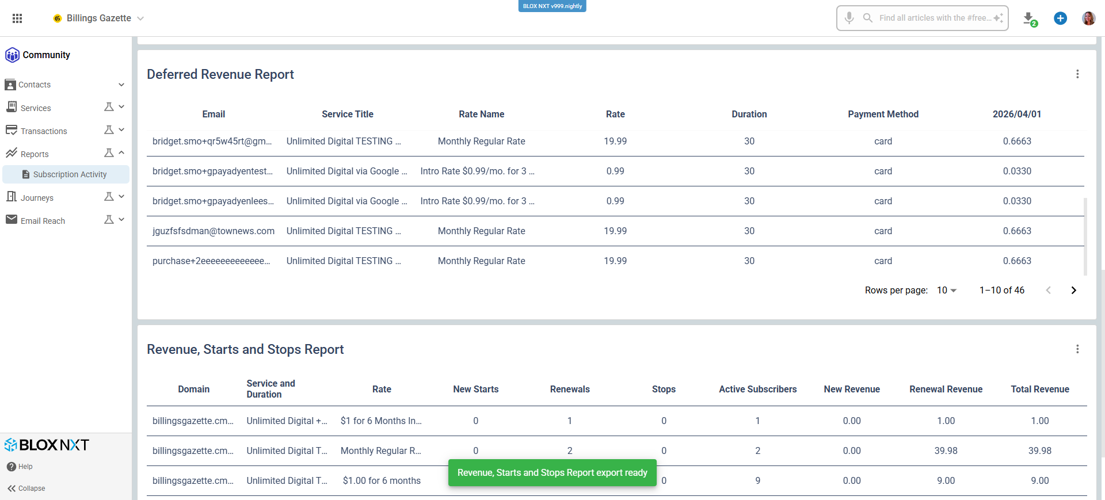
A brand-new Reports dashboard is now available within the Community menu as a one-stop destination for subscription insights. Administrators with Audience+ access can filter data and export it to CSV for deeper analysis, auditing, and decision-making. (CMSADMIN-1704)
Domain Management in Service Configuration
A domain management tool has been added to the NXT service configuration interface for bulk adding, sorting, and exporting website URLs, allowing administrators to manage domain-based service access more efficiently. (CMSADMIN-1919)
Bugs
Fixed several issues with Find & Replace functionality in the article editor, including search highlights persisting after the panel was closed and incorrect highlight behavior when switching between fields. (CMSADMIN-2242)
Fixed an issue where the Create and Replace actions for Quick Filters in the Asset Library modal did not retain the search parameters set within the modal. (CMSADMIN-2228)
Fixed an issue where dashboard widgets failed to render their initial data on Safari because the default date range was not being populated correctly. (CMSADMIN-2225)
Fixed several issues with the Create Asset modal, including date/time timezone handling, the Clear button behavior, and a problem where the modal could open when already on the create screen. (CMSADMIN-2220)
Fixed a grammar issue with the Copy Slug tooltip text displayed in the Edit Slug modal for editorial assets. (CMSADMIN-2202)
Fixed an issue where saving an article while an inline asset was still uploading could result in faulty inline items after refresh. (CMSADMIN-2190)
Fixed an issue where the Trim Video option was accessible to users who did not have the premium video privilege enabled. (CMSADMIN-2185)
Fixed an issue where Cover Art top text could overlap and block the Edit, Display, and Remove buttons when using the "Text vertical alignment: Top" display style. (CMSADMIN-2178)
Fixed an issue where the Teaser preview displayed Remove and Crop options even when no teaser was specifically set on the asset. (CMSADMIN-2144)
In this release we are making infrastructure changes that should not be noticeable to admin or front-end users. If you experience any issues or have any questions, please contact customer support at (800) 293-9576 or BLOXDigital.com/support.


