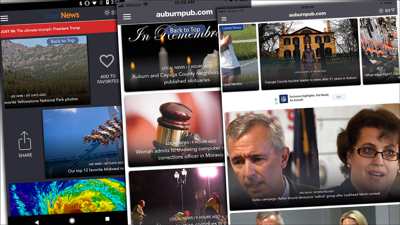
The BLOX Now App 2.0 includes new revenue opportunities, design changes and improved overall functionality.
New, modern design
The new version features an improved design which includes: more space between items, rounded corners, and subtle gradations on asset cards.
Side-to-side article swiping
Article-to-article swiping now available! This user-friendly way to navigate between stories significantly improves page views on mobile devices.
Interstitial ads and new ad sizes
Place interstitial ads between article side-to-side swipes. Configure the number of articles between ads in the BLOX Now App settings panel.
In addition, ads on the feed or topic pages can now accept additional sizes: 320x50, 300x250, or 300x50.
Custom push notifications
Push notifications now support multiple topics. Set up topics in the BLOX Broadcast application. When the app is installed, users are prompted to give permission for notifications. Users can then manage notifications in the settings panel inside the app.
Color updates and customizations
Use the BLOX Now App customization panel to set the following colors:
Background color
Background text color
Header color
Header text color
Menu color
Menu text color
The breaking news and pinned content areas have also been updated to support a background color and a text color.
Custom sub-sections
Have different colors or unique navigation links on sub-sections. The settings options for each section will now affect individual sections instead of looking to the main BLOX Now App section for settings.
Other changes
The BLOX Now App 2.0 supports a universal app view for the iPad and a tablet view on Android. This will allow users on these devices to download the application and have an improved experience.
The weather icon in the top-right corner is now available in these additional areas: Terms of Service, Privacy Policy, About Us, and Settings.
The in-app logo now acts like a "home" button, bringing the reader back to the top of the home feed page.
The site administrator now has the ability to change the label for "Topics" and "More" in the slide-in menu. The order of topics can also be changed. The default will list the topics alphabetically.
Links in the slide-in menu from the same domain now open inside the app. If not the same domain, links will open in the device's default browser.
If enabled, subscriptions on the main site will now also affect asset pages in the BLOX Now App. Subscription access can be disabled in the BLOX Now App settings.
A new header request is being sent as part of the BLOX Now App, allowing servers to react to the app mode in a better way—improving usability and ensuring the app doesn't get rate limited.
Let us answer your questions and introduce you to BLOXDigital, the industry's premier content delivery platform tailored for modern digital media enterprises.
Learn how to boost revenue, audience engagement, and efficiency.