

Overview
Client version 5.74 added a major new feature that allows users to output a page to multiple e-Editions. Activating it is as simple as modifying the output preferences. During output, the user will be prompted to select the destination's domain, publication, date, section, page number, etc.
tl;dr
Modify your output preferences to include the following:
<promptForEEditionSharing>true</promptForEEditionSharing>
Output pages, and use the prompts to share the page(s) where desired.
Setup
As described above, the configuration is as simple as adding the above line to the appropriate output preferences
Other Output Requirements
The functionality can only be added to an output to Page Tracker. If you're not configured to use:
<outputType>pagetracker</outputType>
The functionality won't work.
In addition, there are a few other requirements that are standard fare for Page Tracker output:
<backgroundOutput>false</backgroundOutput>
<backupDocument>false</backupDocument>
<closeWhenComplete>false</closeWhenComplete>
<forceFinalProcess>true</forceFinalProcess>
<includeCoordinates>true</includeCoordinates>
<limitMultipage>true</limitMultipage>
Finally, you need to be configured to use <checkInAssets> with <workflow>, <name>, and <process> tags
Luckily the Template Master feature at `BLOX Total CMS > Development > Create Base Output Preferences...` function will construct a sample output preferences file with ALL necessary items for both a `BLOX Total CMS > Documents > Output > Sample Final > Sample + Desktop` and `BLOX Total CMS > Documents > Output > Update Page Tracker` with the final `Pages` workflow process. Those samples can be used, but be careful of ramifications:
- Backup your existing Output Preferences
- If your site wisely used `BLOX Total CMS > Development > Page Tracker Output Management > Upload Output Preferences XML`, simply creating a new file won't do anything because the uploaded version is in use. The modified output preferences need to be uploaded to replace the existing uploaded version.
- Changes don't immediately affect users. After the Output Preference changes, users will need to use `BLOX Total CMS > Update and Reset > Output Menu` or log out and back in again.
If you're in the Template Master's Development Mode, and you upload new Output Preferences and/or update the Output Menu, you should be warned if you configured the output incorrectly.
If you want assistance with these changes, please file a support request at: https://support.bloxdigital.com/
General Use
- Construct the Source document. Complete the workflow before sending the final version of the page to the press or imposition system.
- Choose the modified Output method
- After all the prompts for output, you'll get a prompt similar to the following:
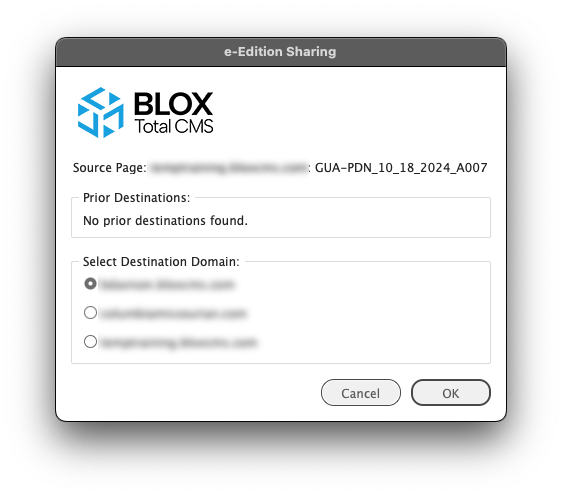
When a properly configured Output Method is used, the user will be prompted with the e-Edition Sharing's Select Destination Domain: dialog similar to this one. Select the desired domain to share the page(s) to. Then click the OK button.
- Select the Destination Domain to share the page
- Click the `OK` button
- If you've not used the `Destination Domain` yet, you'll need to wait while the BLOX Total CMS client for Adobe InDesign logs in to that domain and gets its preferences and page naming convention. Eventually, you'll see a shared page naming dialog similar to the one below:

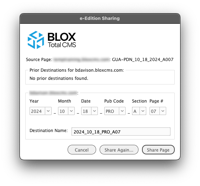
Use this dialog to select the Destination Page Name when using the Live e-Edition sharing functionality.
If you need to share the Source Page with multiple Destination's, use the `Share Again...` button. For a single share, choose `Share Page` even if it is a multiple page document.
- Use the controls to specify the name of the destination page.
- If the Source Document has a single page, you can select any of the naming convention options.
- If the Source Document has multiple pages, you will be prevented from changing the Section or Page Number so that any jump lines will read correctly in the Destination Domain.
- Either click `Share Page...` if you are sharing a single alternate Live e-Edition or click `Share Again...` if you need to share the document's pages to multiple sites.
What about Folios?
Client 5.73 added a Template Master Feature to mark page items (Objects and/or Frames) as being `Branded`. The Branded Page Items will NOT be included in the PDF when using a <promptForEEditionSharing> configured output method. The items remain on the page but are temporarily set to `Non-Printing` and thus excluded from the PDF. If the Page Items affect other Page Items via Text Wrap, that effect is still active. Only the PDF Output (a form of `printing`) is affected.
If you want to have NO original (Source Domain) publication branding, then the Parent Pages for the inside pages with folios in the template for the Source Publication should have those folio items set with `BLOX Total CMS > Development > Mark Branded Items...`
If you want an alternate branding on the shared pages you can stack a pair of page items with the generic ones under the specific ones. Since you can't use Text Wrap to hide the ones below, you'll need to fill the frame with `Paper` or some non-ink using color. Both can use all of the Automatic Folios options, but since all of those are based on the Source Document, you cannot use specific information. It will need to be generic for the publication name. See Alternatives below for more details.
In addition, if you are sharing to a different date, but always the same relative offset from the Source Documents' Publication Date, the Folio Text Variables have a set of date offset variables that can be used. See below for details on all the available Folio Text Variables:
e-Edition Page Sharing with MultiPage Documents:
The e-Edition Sharing processes work fine with multipage documents. The only limitation is that when outputting you must output ALL pages of the document to trigger the prompt for e-Edition Sharing.
See the Frequently Asked Questions section for more on this.
Same-Domain vs. Cross-Domain e-Edition Sharing:
The <promptForEEditionSharing>true</promptForEEditionSharing> option can be used when sharing to publications that are either hosted by the same domain or an alternative domain. The process is significantly different, however.
For Same-Domain e-Edition Sharing the sent PDF and Segments are simply forwarded to Page Tracker which then forwards everything to Live e-Editions. This is the same way normal pages make it to e-Editions. Since the assets are in the same domain, nothing special has to happen.
For Cross-Domain e-Edition Sharing, the Source page's assets have to be syndicated to the Destination Domain for the segmentation to work. That process is kick-started by the client by internally calling the `BLOX Total CMS > Cross Domain Clone > Request...` functionality. That feature was added with client version 5.69 and is described below:
Basic Use of BLOX Total CMS Cross Domain Clone to Share Adobe InDesign Pages
After asking for the assets to be syndicated to the Destination Domain, the client then makes a direct call to e-Editions and passes the PDF and the segmentation for the Source assets. e-Editions will then attempt to link the original assets with the syndicated versions.
The syndication itself is handled via site tags.
Required Site Tags for Cross-Domain e-Edition Sharing:
For the Cross-Domain e-Edition Sharing, the assets attempt to make it to the destination via the application of site tags. Those site tags MUST exist. If you need help adding them, please file a support ticket at https://support.bloxdigital.com/
But just because an asset gets a site tag, it doesn't mean that it will syndicate to that destination site. Many things can prevent syndication. Some of the common reasons include:
- The asset originated on the destination site.
- i.e. The asset started on domain `ABC` and was syndicated to domain `XYZ`. The page was built using the `XYZ` copy of the asset and Cross-Domain Clone/Cross Domain e-Edition Sharing attempted to share back to `ABC`.
- This is always prevented. Plan where pages are built and use assets from appropriate source domains.
- Digital Rights Management (DRM) rules disallow the asset from syndicating as the destination site does not have permission.
- Generally, this is most likely on assets that came from 3rd parties like The Associated Press or other organizations.
- Sometimes a site might have an importer set to limit cross-domain syndication. That limitation can generally be disabled.
- The asset already exists under a different uuid and syndicate_match_on_externals is not enabled on the destination domain.
- For example, both domains `ABC` and `XYZ` get feeds from The Associated Press. A page is built in the `XYZ` domain using the `XYZ` copy of the asset. Without the syndicate_match_on_externals option, the asset won't syndicate to `ABC` because a different copy of the asset already exists there.
- Keep in mind, that if it does, it might be edited differently and thus the Live e-Edition River of News version of the asset might be different than the printed version in the Source Document.
- The asset is in a BLOX Workflow that is set to `Block syndication`
- Remove that option from the BLOX Workflow's settings or assign assets to a different BLOX Workflow without that setting.
- The asset was imported but did not become a child.
- BLOX assets have hard limits on the number of parent/child relationships. If that limit is violated when syndicating, it won't syndicate.
- There have been reports of assets not properly linked to their parent or child assets when syndicating. This should only affect the appearance of the River of News.
What about the Destination Documents when using e-Edition Sharing?
Both the Same-Domain e-Edition Sharing and the Cross-Domain e-Edition Sharing do NOT involve using Adobe InDesign for the Destination page. The sharing is the Adobe PDF output of the Source Document. The PDF and Segmenting are forwarded to eEditions without using an Adobe InDesign-based document named for the destination.
If your advertising system generates the Destination Document, and it likely does, ignore it. Just ignore it. Communicate to the staff that the page(s) will be generated via the sharing feature. You got this. You work for a communication company and you can communicate to staff how specific pages should be produced. The purpose of e-Edition Sharing is to reduce work. Don't make work locating the original destination document and attempting to remove it.
Alternatives to e-Edition Sharing:
Besides this PDF-based sharing, there is the long-standing `Clone and Move...` feature. This works on the same domain and copies assets and Page Items from a source page to a destination page in Adobe InDesign. `Clone and Move...` has existed since 2016. It is powerful, but because of limitations with Adobe InDesign, some page items can stack incorrectly. So, unlike this Live e-Edition Sharing, some work on the destination page may be necessary. `Clone and Move...` requires that the documents exist before use, so it's harder to use in advance. However, since you'll have Adobe InDesign documents, you can modify them and the folios as desired. `Clone and Move...` can replicate some ad stacks if necessary.
The `Cross Domain Clone > Request...` and `Cross Domain Clone > Complete...` functions were added with client version 5.69. They execute a Cross-Domain equivalent of `Clone and Move...`. The Cross Domain versions only replicate Page Items associated with assets. These functions do NOT replicate non-asset holding frames. This means it allows page branding from things like `Page Content Snippets` to be unique to the Destination Pages. But, since you'll be working with Adobe InDesign pages, you can modify the page's appearance as desired.
Frequently Asked Questions:
• I needed to fix a mistake on the Source Page. How do I update all the shared pages?
When you send the output for the correction, you'll follow the same e-Edition Sharing steps.
If it was a Cross Domain e-Edition Sharing, the dialogs list the prior destinations.
• But the correction was a single page of a multi-page document. How do I reshare just one page?
There are two options here:
- Just resend the entire set of pages. You can communicate to the press/composition room that they should ignore the new PDFs for the pages without corrections. This is the fastest solution for the page-building staff
- Use a normal output and specify the corrected page. That prevents using e-Edition Sharing, however. Complete the process with a Page Tracker-only export to trigger the e-Edition Sharing dialogs and functionality.
• Some of our Multi-page Documents are a mix of Color and Black & White pages. We currently output each page separately. How do I handle that?
That's solvable! Since 2021, the Output Preferences have supported separate names, output folders, and Adobe PDF Presets for Color and Black and White Pages. This is handled by turning on Page Color markers and adding to the Output Preferences pairs of options replacing the default single color methods. Once configured both Color and Black and White pages can be handled by the same `BLOX Total CMS > Documents > Output > menu group > method choice`. If you would like assistance with enabling these options please file a support request at: https://support.bloxdigital.com/
- To turn on Page Color Markers and the client's knowledge of a Page's color, use `Page Tracker Application Settings > Output and Segmenting > Miscelenaous > Track Page Colors`
- To specify a different folder for Color and Black and White PDFs, add to the Output Preferences complete <folderPath_BW> or <folderPathMacOS_BW> tags in addition to the required <folderPath> that are used for color pages.
- To specify a different Adobe PDF Preset for Color and Black and White PDFs, add to the Ouptut Preferences a complete <preset_BW> pair of tags in addition to the <preset> version used for color pages.
- To specify different names for Color and Black and White PDFs, add either a pair of <namingConvention_BW> or <validateName_BW> tags in addition to the existing <namingConvention> or <validateName> versions.
And if you don't want to fully automate the output using the above, you can still output the entire document using a Page Tracker-only option. It wastes time, but it's your time.
• I want to Print the Shared Pages too!
The Page Tracker Output Type has had a <chain> function available since 2017 that can share multiple PDFs for print without any user interface.
• I don't want the original `source` folios to show on the shared `destination` pages. How do I do that?
Use the Template Master `BLOX Total CMS > Development > Mark Branded Items...` feature. This feature was added to version 5.73 of the BLOX Total CMS client for Adobe InDesign. In its most basic form, you would mark only the page item holding the source document's publication name. There are more complicated things that can happen by stacking generic folios under the source document's branding.
You might need to divide the folios into more page items to allow for the proper showing/hiding. When you do, please align the page items to column guides because all page items affect Adobe InDesign's awesome snap-to features.
• Are Branded Page Items Required?
No. The sharing will be slightly faster without it because the original PDF with its branding will be shared.
• Does this work with Document Jump Pages?
No. Document Jump Pages requires the use of non-printing items. However, the Branded Page Item feature hides non-printing items. The two are mutually exclusive.
You can, however, use Dynamic Jumps and maintain the links in the river of news.
And, while not recommended, you can also use Dead Jumps.
• I need different ads on the Destination Pages. How do I handle that?
You need valid Adobe InDesign Documents for those Destination Pages. This e-Edition Sharing option is NOT for you. You can supplement the workflow with Alternatives to e-Edtion Sharing, however.


